Swap HTTP Client Library TypeScript: เปลี่ยน axios เป็น fetch โดยไม่แตะ UseCase
Scale-Ready Architecture · Bonus ของ Part 6
Swap HTTP Client Library TypeScript: เปลี่ยน axios เป็น fetch โดยไม่แตะ UseCase
Bonus นี้ต่อยอดจาก Part 6 — share-client โดยตรง
Part 6 อธิบาย
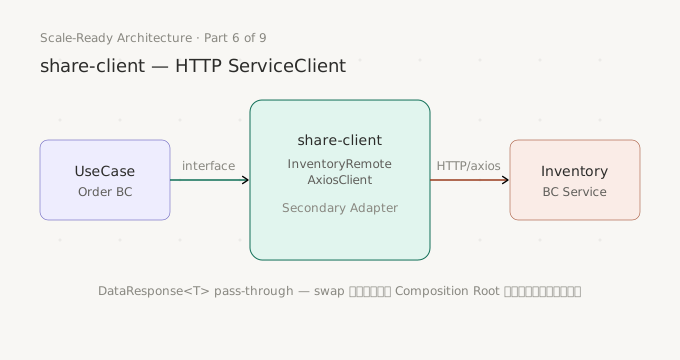
share-clientแบบ axios เป็น default และ swap ระดับ ServiceClient (HTTP ↔ Internal) — Bonus นี้ขยาย concept ไปที่ swap ระดับ HTTP Library (axios ↔ fetch) ภายในshare-clientเองแนะนำให้อ่าน Part 6 ก่อน โดยเฉพาะ section
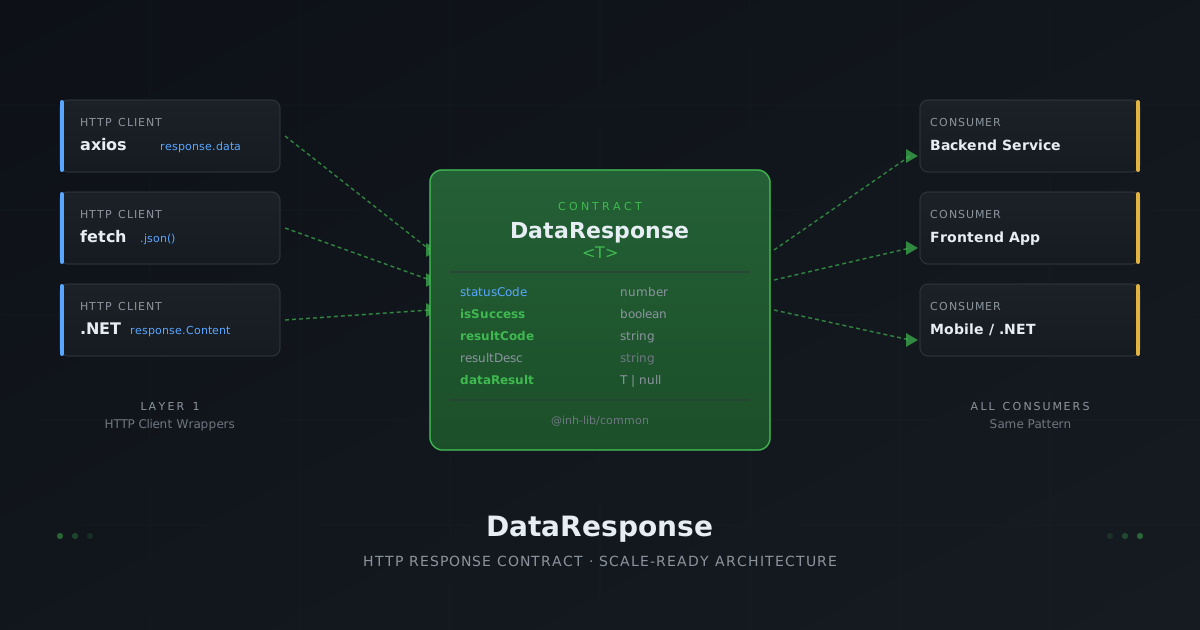
DataResponse<T>และInventoryRemoteAxiosClientเพราะ Bonus นี้ไม่ repeat เนื้อหาเหล่านั้น
ทำไมต้อง swap HTTP Library — axios ไม่ได้รันได้ทุกที่
ทีมส่วนใหญ่เริ่มต้นด้วย axios เพราะ ergonomic ดี มี interceptor ให้ใช้ทันที และ error handling ตรงไปตรงมา — แต่วันหนึ่งความต้องการเปลี่ยน
Edge Runtime ไม่รองรับ axios Cloudflare Workers, Vercel Edge Functions และ Deno Deploy รัน JavaScript ใน restricted environment ที่ไม่มี Node.js API เต็มรูปแบบ axios depend บน Node.js http module ทำให้ deploy ไม่ได้เลยในหลาย Edge Runtime ส่วน fetch เป็น Web Standard ที่ run ได้ทุกที่ตั้งแต่ browser จนถึง Cloudflare Workers
axios เป็น dependency ที่ต้องติดตั้งเสมอ ขนาด ~13KB (minified+gzipped) ถ้าโปรเจกต์มีหลาย package ที่รัน standalone เช่น Lambda Function หรือ Edge Worker ขนาด bundle มีผลโดยตรงต่อ cold start time fetch เป็น built-in ใน Node.js 18+ ขนาดเพิ่มเป็นศูนย์
Streaming response fetch return ReadableStream native ตาม Web Streams API ใช้งานได้ทุก runtime ที่รองรับ fetch ส่วน axios ทำ streaming ได้ใน Node.js แต่ต้องใช้ config เพิ่มและไม่รองรับใน Edge Runtime
ปัญหาคือ ถ้า HTTP Library ผูกอยู่กับ UseCase การเปลี่ยนจาก axios เป็น fetch หมายความว่าต้องแตะทุกไฟล์ที่มี axios call — UseCase, test file และ mock setup พร้อมกัน
แต่ถ้า share-client ออกแบบถูก เปลี่ยน library ได้โดยไม่แตะ UseCase เลยแม้แต่บรรทัดเดียว
ทำไมถึง swap ได้ — Secondary Adapter boundary
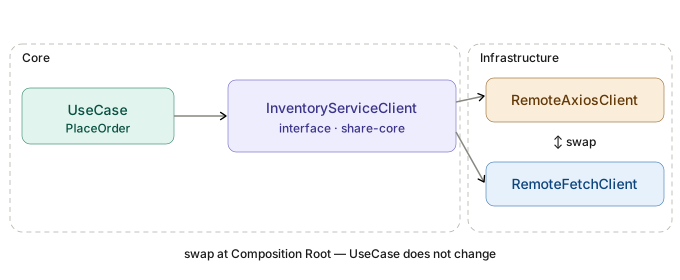
UseCase รู้จักแค่ InventoryServiceClient interface จาก share-core ไม่รู้ว่าเบื้องหลัง implementation ใช้ HTTP library ตัวไหน
share-core
  └── InventoryServiceClient interface   ← UseCase รู้จักแค่นี้
              ↑ implements
share-client
  ├── InventoryRemoteAxiosClient         ← axios implementation
  └── InventoryRemoteFetchClient         ← fetch implementation (เพิ่มใน Bonus นี้)
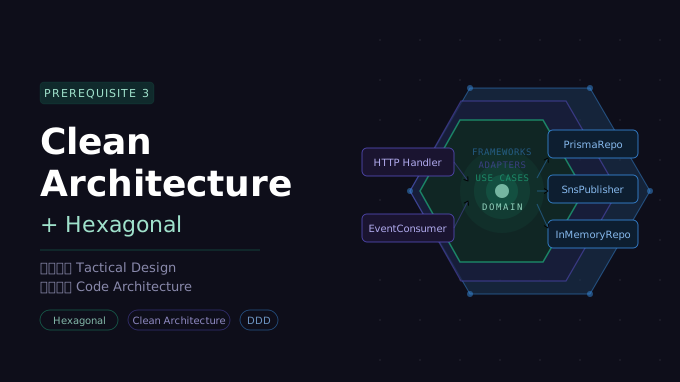
ใน Prerequisite 3 — Clean + Hexagonal Architecture อธิบายไว้ว่า share-client คือ Secondary Adapter (Driven) — ตาม Dependency Rule ของ Clean Architecture Infrastructure Layer (Secondary Adapter) ชี้เข้าหา Core ได้ แต่ Core ไม่รู้จัก Infrastructure
swap ระดับนี้คือการเปลี่ยน implementation ที่ชั้นนอกสุด โดย Core ไม่ถูกแตะเลย ต่างจาก swap ระดับ ServiceClient (HTTP ↔ Internal) ที่ Part 6 cover แล้ว ซึ่งเป็นการเปลี่ยนว่า UseCase คุยกับ BC อื่นผ่าน HTTP หรือ in-process
Swap ระดับ ServiceClient (Part 6):
  HTTP  InventoryRemoteAxiosClient
      ↕ เปลี่ยนที่ Composition Root
  In-process InventoryInternalClient

Swap ระดับ HTTP Library (Bonus นี้):
  axios  InventoryRemoteAxiosClient
      ↕ เปลี่ยนที่ Composition Root
  fetch  InventoryRemoteFetchClient
ทั้งสอง swap เกิดที่ Composition Root บรรทัดเดียว UseCase ไม่รู้เลยในทั้งสองกรณี
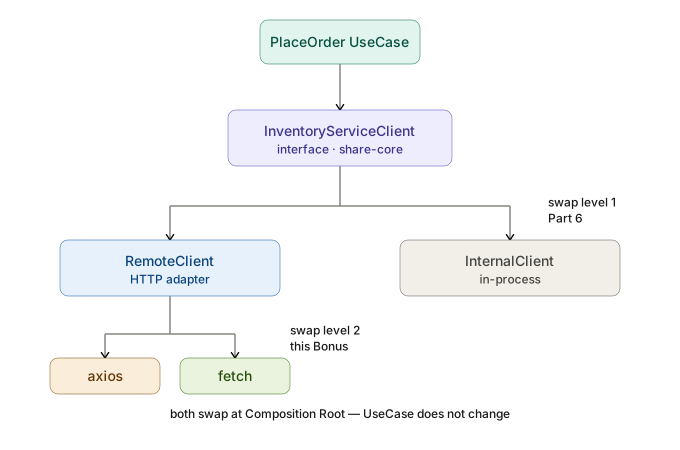
ความต่างที่ต้องรู้ก่อน swap
สิ่งที่ fetch ทำได้ดีกว่า
Streaming Response — response.body เป็น ReadableStream ตาม Web Streams API ใช้งานได้ทุก runtime รองรับ SSE และ chunked download โดยไม่ต้อง Node.js stream adapter
AbortController — Web Standard ที่ใช้ได้ทุก runtime axios รองรับ AbortController ตั้งแต่ v0.22+ เช่นกัน แต่ fetch ออกแบบมาให้ใช้คู่กันตั้งแต่แรก
Edge Runtime compatibility — fetch เป็น built-in ใน browser, Node.js 18+, Deno, Bun และ Cloudflare Workers ไม่ต้องติดตั้งอะไรเพิ่ม
Bundle size — 0KB สำหรับ Node.js 18+ เพราะเป็น built-in
สิ่งที่ต้อง implement เพิ่มเมื่อใช้ fetch (axios ทำให้อัตโนมัติ)
เช็ค response.ok เอง — axios throw error อัตโนมัติเมื่อ HTTP status เป็น 4xx หรือ 5xx แต่ fetch ถือว่า “สำเร็จ” เมื่อรับ response กลับมาได้ ไม่ว่า status จะเป็นอะไร response.ok เป็น false เมื่อ status ไม่อยู่ในช่วง 200-299 แต่ไม่ throw
JSON.stringify request body เอง — axios จัดการ serialization ให้อัตโนมัติเมื่อ body เป็น object fetch ต้องทำเองพร้อมกับ set Content-Type: application/json header
Timeout ด้วย AbortController — axios มี { timeout: ms } option พร้อมใช้ fetch ต้อง implement timeout เองด้วย AbortController + setTimeout หรือ Promise.race
ไม่มี interceptor — axios interceptor เป็น feature ที่ใช้บ่อยสำหรับ attach auth header หรือ log request fetch ไม่มี interceptor built-in ต้อง wrap function เอง
response.json() — axios parse JSON response body ให้อัตโนมัติ เข้าถึงได้ผ่าน response.data fetch ต้องเรียก await response.json() เอง
ตารางสรุปเปรียบเทียบ
| Feature | axios | fetch |
|---|---|---|
| Auto JSON parse response | ✅ | ❌ ต้อง .json() เอง |
| Throw on 4xx/5xx | ✅ | ❌ ต้องเช็ค response.ok |
| Request timeout | { timeout: ms } | AbortController + setTimeout |
| Auto JSON.stringify body | ✅ | ❌ ต้องทำเอง |
| Set Content-Type | ✅ อัตโนมัติ | ❌ ต้อง set เอง |
| Request interceptor | ✅ | ❌ |
| Streaming response | ⚠️ Node.js only | ✅ Web Standard |
| AbortController | ✅ v0.22+ | ✅ native |
| Edge Runtime | ⚠️ ไม่รองรับทุกตัว | ✅ built-in |
| Bundle size | ~13KB | 0KB |
| TypeScript generic type | axios.get<T>() | response.json() as T (ไม่มี runtime check) |
Baseline — InventoryRemoteAxiosClient
Implementation เต็มมีอยู่แล้วใน Part 6 — ส่วนนี้สรุปจุดสำคัญที่จะเปรียบเทียบกับ InventoryRemoteFetchClient
// share-client/src/inventory-api/inventoryRemoteAxiosClient.ts

import type {
  InventoryServiceClient,
  ReserveInput,
  ReservationResult,
  StockLevel,
  Money,
  HoldResult,
} from '@system/share-core/shared/service-client/inventoryServiceClient.type'
import { DataResponse, toBaseFailure, toFailDataResponse } from '@inh-lib/common'
// ✅ toFailDataResponse import จาก @inh-lib/common — ไม่ต้องนิยามเอง
import axios from 'axios'

// ─── InventoryRemoteAxiosClient ───────────────────────────────────────────────

export class InventoryRemoteAxiosClient implements InventoryServiceClient {
  constructor(private readonly baseUrl: string) {}

  // axios generic type → response.data เป็น DataResponse<T> เสมอ
  // pass-through ตรง ๆ ไม่ unwrap เอง

  async checkStock(sku: string): Promise<DataResponse<StockLevel>> {
    try {
      const response = await axios.get<DataResponse<StockLevel>>(
        `${this.baseUrl}/inventory/stock/${sku}`
      )
      return response.data  // ✅ pass-through — axios throw เมื่อ 4xx/5xx อัตโนมัติ
    } catch (e) {
      const failure = toBaseFailure(e)
      return toFailDataResponse(failure.code, failure.message)
    }
  }

  async reserve(items: ReserveInput[]): Promise<DataResponse<ReservationResult>> {
    try {
      const response = await axios.post<DataResponse<ReservationResult>>(
        `${this.baseUrl}/inventory/reserve`,
        { items }  // ✅ axios serialize JSON + set Content-Type อัตโนมัติ
      )
      return response.data
    } catch (e) {
      const failure = toBaseFailure(e)
      return toFailDataResponse(failure.code, failure.message)
    }
  }

  async release(reservationId: string): Promise<DataResponse<null>> {
    try {
      const response = await axios.delete<DataResponse<null>>(
        `${this.baseUrl}/inventory/reservations/${reservationId}`
      )
      return response.data
    } catch (e) {
      const failure = toBaseFailure(e)
      return toFailDataResponse(failure.code, failure.message)
    }
  }

  async hold(amount: Money): Promise<DataResponse<HoldResult>> {
    try {
      const response = await axios.post<DataResponse<HoldResult>>(
        `${this.baseUrl}/inventory/hold`,
        { amount }
      )
      return response.data
    } catch (e) {
      const failure = toBaseFailure(e)
      return toFailDataResponse(failure.code, failure.message)
    }
  }
}
จุดสำคัญสามข้อที่ axios จัดการให้อัตโนมัติและ InventoryRemoteFetchClient ต้องทำเอง
- throw เมื่อ 4xx/5xx —
catch (e)ของ axios จับได้ทั้ง network error และ HTTP error - JSON.stringify body — ส่ง object เข้า
axios.post(url, body)ได้เลย response.dataเป็นDataResponse<T>— axios parse JSON และใส่ใน generic type ให้
Swap เป็น fetch — InventoryRemoteFetchClient
package.json ที่ถูกต้องเมื่อต้องการ support ทั้ง axios และ fetch — axios เป็น optional
{
  "name": "@system/share-client",
  "dependencies": {
    "@system/share-core": "*"
  },
  "peerDependencies": {
    "axios": "^1.0.0",
    "@inh-lib/common": "*"
  },
  "peerDependenciesMeta": {
    "axios": {
      "optional": true
    }
  }
}
axios เป็น optional — ถ้าใช้ InventoryRemoteFetchClient อย่างเดียวไม่ต้องติดตั้ง axios เลย fetch เป็น built-in ใน Node.js 18+ จึงไม่ต้องใส่ใน peerDependencies
Node.js version compatibility
- Node.js 18+ —
fetchbuilt-in ไม่ต้องติดตั้งอะไรเพิ่ม- Node.js 16 หรือต่ำกว่า — ต้องใช้ polyfill เช่น
node-fetchหรือundiciและต้อง setglobal.fetchก่อนใช้
Folder Structure
safeFetch และ createFetchJson ไม่ได้ผูกกับ BC ไหน — แยกออกมาเป็น shared utility ใน src/shared/remote-fetch/ ทุก *RemoteFetchClient ใช้ร่วมกันได้
share-client/src/
  ├── shared/
  │     └── remote-fetch/
  │           ├── remote-fetch.type.ts    ← FetchJson type
  │           ├── remote-fetch.ts         ← safeFetch, createFetchJson
  │           ├── index.ts                ← barrel: re-export public API
  │           └── __tests__/
  │                 └── remote-fetch.test.ts
  │
  └── inventory-api/
        ├── inventoryRemoteAxiosClient.type.ts
        ├── inventoryRemoteAxiosClient.ts
        ├── inventoryRemoteFetchClient.type.ts
        ├── inventoryRemoteFetchClient.ts
        ├── index.ts
        └── __tests__/
              └── inventory-api.test.ts   ← รวมทุก client ของ BC นี้ไว้ที่เดียว
remote-fetch.type.ts
// share-client/src/shared/remote-fetch/remote-fetch.type.ts

import type { DataResponse } from '@inh-lib/common'

export type FetchJson = <T>(
  url: string,
  options?: RequestInit
) => Promise<DataResponse<T>>
remote-fetch.ts
// share-client/src/shared/remote-fetch/remote-fetch.ts

import { toBaseFailure, toFailDataResponse } from '@inh-lib/common'
import type { FetchJson } from './remote-fetch.type'

// safeFetch — ชดเชย feature ที่ axios ทำให้อัตโนมัติ
// fetch ไม่ throw เมื่อ 4xx/5xx และไม่มี timeout built-in
// export เพื่อ test ได้โดยตรง — consumer import ผ่าน index.ts เท่านั้น

export const safeFetch = async (
  url: string,
  options: RequestInit,
  timeoutMs: number
): Promise<Response> => {
  const controller = new AbortController()
  const timeoutId = setTimeout(() => controller.abort(), timeoutMs)

  // new Headers() รับ HeadersInit ทั้งสามรูปแบบได้เลย (Record | string[][] | Headers)
  const headers = new Headers(options.headers)
  if (!headers.has('Content-Type')) {
    headers.set('Content-Type', 'application/json')  // ✅ ต้อง set เอง — axios ทำให้อัตโนมัติ
  }

  try {
    const response = await fetch(url, { ...options, signal: controller.signal, headers })
    // ✅ เช็ค response.ok เอง — axios throw เมื่อ 4xx/5xx fetch ไม่ throw
    if (!response.ok) throw new Error(`HTTP ${response.status}: ${response.statusText}`)
    return response
  } finally {
    clearTimeout(timeoutId)
  }
}

// createFetchJson — factory ที่ close over timeoutMs
// export เพื่อ test ได้โดยตรง — consumer import ผ่าน index.ts เท่านั้น

export const createFetchJson = (timeoutMs: number): FetchJson =>
  async <T>(url: string, options?: RequestInit): Promise<DataResponse<T>> => {
    try {
      const response = await safeFetch(url, options ?? {}, timeoutMs)
      return (await response.json()) as DataResponse<T>
    } catch (e) {
      const failure = toBaseFailure(e)
      return toFailDataResponse(failure.code, failure.message)
    }
  }
index.ts — barrel ควบคุม public API
// share-client/src/shared/remote-fetch/index.ts

// consumer import จาก shared/remote-fetch จะเห็นแค่ createFetchJson และ FetchJson type
// safeFetch ไม่ expose ออกไป — เป็น implementation detail ของ createFetchJson

export type { FetchJson } from './remote-fetch.type'
export { createFetchJson } from './remote-fetch'
ทำไม
safeFetchไม่ export ออกจาก barrel
safeFetchเป็น implementation detail ของcreateFetchJson— consumer ทุกคนใช้createFetchJsonเสมอ ไม่มีเหตุผลต้อง callsafeFetchโดยตรงแต่
safeFetchยังexportไว้ในremote-fetch.tsเพื่อให้ test import โดยตรงจาก file ได้ — test ที่ดีควร test ทุก function ไม่ใช่แค่ public API
toFailDataResponseอยู่ที่@inh-lib/commonไม่ใช่share-client
toFailDataResponseconstructDataResponse<null>สำหรับกรณีที่ไม่มี response body กลับมา เช่น network error หรือ timeout — ไม่ผูกกับ HTTP library ใด ไม่ผูกกับ BC ใด และใช้ได้ในทุก project ที่มีshare-clientไม่ว่าจะเป็น repo ไหนถ้าวางไว้ใน
share-clientแต่ละ repo จะต้องเขียน function เดิมซ้ำทุกที่ จึงควรอยู่ใน@inh-lib/commonเช่นเดียวกับtoBaseFailureและDataResponsetype ที่อยู่ที่นั่นอยู่แล้ว// @inh-lib/common — แสดงเพื่อความเข้าใจ ไม่ใช่ implementation จริง // import มาใช้ได้เลย ไม่ต้องเขียนเอง export const toFailDataResponse = ( resultCode: string, resultDesc: string, statusCode = 500 ): DataResponse<null> => ({ statusCode, isSuccess: false, resultCode, resultDesc, // dataResult เป็น null เสมอ เพราะ toFailDataResponse ใช้เฉพาะกรณี // network error หรือ timeout ที่ไม่มี response body กลับมาเลย // กรณีที่ server ตอบ fail แต่มี body เช่น batch partial fail // share-client pass-through DataResponse จาก server ตรง ๆ ไม่ได้ใช้ toFailDataResponse dataResult: null, })
inventoryRemoteFetchClient.ts — constructor injection
// share-client/src/inventory-api/inventoryRemoteFetchClient.ts

import type {
  InventoryServiceClient,
  ReserveInput,
  ReservationResult,
  StockLevel,
  Money,
  HoldResult,
} from '@system/share-core/shared/service-client/inventoryServiceClient.type'
import type { DataResponse } from '@inh-lib/common'
import { createFetchJson } from '../shared/remote-fetch'
import type { FetchJson } from '../shared/remote-fetch'

export class InventoryRemoteFetchClient implements InventoryServiceClient {
  private readonly fetchJson: FetchJson

  constructor(
    private readonly baseUrl: string,
    timeoutMs = 5000,
    // production ใช้ default — test inject mock แทนได้
    fetchJson?: FetchJson
  ) {
    this.fetchJson = fetchJson ?? createFetchJson(timeoutMs)
  }

  checkStock(sku: string): Promise<DataResponse<StockLevel>> {
    return this.fetchJson(`${this.baseUrl}/inventory/stock/${sku}`)
  }

  reserve(items: ReserveInput[]): Promise<DataResponse<ReservationResult>> {
    return this.fetchJson(`${this.baseUrl}/inventory/reserve`, {
      method: 'POST',
      body: JSON.stringify({ items }),  // ✅ ต้อง serialize เอง — axios ทำให้อัตโนมัติ
    })
  }

  release(reservationId: string): Promise<DataResponse<null>> {
    return this.fetchJson(`${this.baseUrl}/inventory/reservations/${reservationId}`, {
      method: 'DELETE',
    })
  }

  hold(amount: Money): Promise<DataResponse<HoldResult>> {
    return this.fetchJson(`${this.baseUrl}/inventory/hold`, {
      method: 'POST',
      body: JSON.stringify({ amount }),
    })
  }
}
สิ่งที่ safeFetch เพิ่มเข้ามาเพื่อชดเชย axios:
| สิ่งที่ขาด | วิธีชดเชย |
|---|---|
| Auto throw on 4xx/5xx | เช็ค response.ok แล้ว throw เอง |
| Timeout option | AbortController + setTimeout |
| Set Content-Type | ใส่ใน default headers ของ safeFetch |
| JSON parse response | เรียก response.json() ทุก method |
| JSON serialize body | JSON.stringify() ก่อนส่ง |
DataResponse pass-through vs throw approach
Bonus นี้เลือก pass-through DataResponse<T> ตรง ๆ โดยไม่ throw — เปรียบเทียบให้เห็นว่าต่างกันอย่างไร
// ❌ throw approach — caller ต้อง try/catch เอง ไม่มี contract ชัดเจน
async checkStock(sku: string): Promise<StockLevel> {
  const response = await fetch(`${this.baseUrl}/inventory/stock/${sku}`)
  if (!response.ok) throw new Error(`HTTP ${response.status}`)
  const data = await response.json()
  if (!data.isSuccess) throw new Error(data.resultDesc)
  return data.dataResult  // ← unwrap ใน share-client ก่อน return
}

// UseCase ต้อง try/catch ทุกที่ — ไม่รู้ล่วงหน้าว่าจะ throw เมื่อไหร่
const placeOrder = async (input: PlaceOrderInput) => {
  try {
    const stock = await deps.inventoryClient.checkStock(input.sku)  // อาจ throw
    if (!stock.available) return Result.fail(...)
  } catch (e) {
    // ต้องจัดการ exception ที่อาจมาจากหลายสาเหตุ: network, timeout, 4xx, 5xx
  }
}
// ✅ DataResponse pass-through — caller รู้ล่วงหน้าว่าจะได้ DataResponse<T>
// ไม่มี exception ที่ไม่คาดคิด UseCase จัดการ isSuccess เอง
async checkStock(sku: string): Promise<DataResponse<StockLevel>> {
try {
const response = await this.safeFetch(`${this.baseUrl}/inventory/stock/${sku}`)
return response.json() as Promise<DataResponse<StockLevel>>
// ✅ pass-through ตรง ๆ — ไม่ unwrap ไม่ throw
} catch (e) {
// network error หรือ timeout — construct DataResponse fail แทน throw
const failure = toBaseFailure(e)
return toFailDataResponse(failure.code, failure.message)
}
}
// UseCase รับ DataResponse<T> — signature บอกล่วงหน้าว่าจะได้อะไร
const placeOrder = async (input: PlaceOrderInput) => {
const stockResponse = await deps.inventoryClient.checkStock(input.sku)
if (!stockResponse.isSuccess) {
// map error ตาม business ของ BC ตัวเอง — ไม่ใช่แค่ re-throw
return Result.fail(new CommonFailures.GetFail('INVENTORY_UNAVAILABLE'))
}
if (!stockResponse.dataResult.available) {
return Result.fail(new CommonFailures.GetFail('OUT_OF_STOCK'))
}
// ...
}Series นี้เลือก DataResponse pass-through เพราะสามเหตุผล
Contract ชัดเจน — Promise<DataResponse<T>> บอก caller ล่วงหน้าทุกกรณีที่เป็นไปได้ ไม่มี hidden exception ที่ต้องจำ
UseCase ตัดสินใจ error ด้วยตัวเอง — resultCode จาก provider เดิมไปถึง UseCase โดยไม่ถูกแปลงระหว่างทาง UseCase ของแต่ละ BC map error ตาม business context ของตัวเองได้
Network error กับ Business error ใช้ shape เดียวกัน — ไม่ว่าจะ timeout หรือ provider ตอบ 404 UseCase รับ DataResponse<null> ที่ isSuccess: false เหมือนกัน ไม่ต้องจัดการสองแบบ
Streaming — กรณีที่ fetch เหนือกว่าชัดเจน
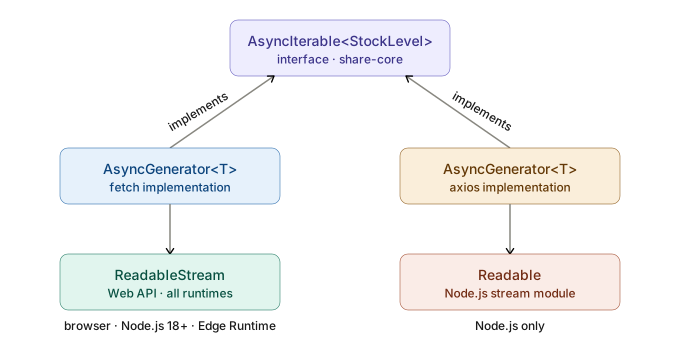
ปัญหาของ return type
Streaming type ต่างกันระหว่าง platform ทำให้ไม่สามารถใส่ใน interface ตรงๆ ได้
// fetch → Web Streams API (browser, Node.js 18+, Edge Runtime)
response.body // ReadableStream<Uint8Array>

// axios → Node.js Stream
response.data // Readable (Node.js เท่านั้น)
ถ้าใช้ ReadableStream ใน interface — axios implement ไม่ได้
ถ้าใช้ Readable ใน interface — fetch บน Edge Runtime implement ไม่ได้
ทางออก — AsyncIterable<T> ใน interface
AsyncIterable<T> เป็น TypeScript/JavaScript built-in type (ECMAScript 2018) ไม่ผูกกับ platform ใด ทั้ง fetch และ axios implement ได้ด้วย async generator function เหมือนกัน ไม่ต้อง install อะไรเพิ่ม ตราบใดที่ tsconfig.json มี "lib": ["es2018"] หรือสูงกว่า
// share-core/src/shared/service-client/inventoryServiceClient.type.ts

export interface InventoryServiceClient {
  reserve(items: ReserveInput[]): Promise<DataResponse<ReservationResult>>
  release(reservationId: string): Promise<DataResponse<null>>
  checkStock(sku: string): Promise<DataResponse<StockLevel>>
  hold(amount: Money): Promise<DataResponse<HoldResult>>

  // ✅ AsyncIterable<T> — platform-agnostic
  // fetch และ axios implement ได้ด้วย async generator เหมือนกัน
  streamStockUpdates(sku: string): AsyncIterable<StockLevel>
}
AsyncGenerator<T>คือ type ของใคร?
AsyncGenerator<T>เป็น built-in type ของ TypeScript/JavaScript (ECMAScript 2018) — นิยามในlib.es2018.asyncgenerator.d.tsไม่ผูกกับ library หรือ platform ใด และAsyncGenerator<T>implementsAsyncIterable<T>อยู่แล้วใน spec ดังนั้น method ที่ returnAsyncGenerator<T>จึงผ่าน TypeScript type check กับ interface ที่ประกาศAsyncIterable<T>โดยไม่ต้อง cast ใดๆ
fetch implement
ใช้ ReadableStream จาก response.body แล้ว yield ออกมาเป็น StockLevel
// share-client/src/inventory-api/inventoryRemoteFetchClient.ts

// AsyncGenerator<StockLevel> implements AsyncIterable<StockLevel> ✅
async *streamStockUpdates(sku: string): AsyncGenerator<StockLevel> {
  const response = await fetch(
    `${this.baseUrl}/inventory/stock/${sku}/stream`,
    { headers: { Accept: 'text/event-stream' } }
  )

  if (!response.ok || !response.body) {
    throw new Error(`Stream failed: HTTP ${response.status}`)
  }

  const reader = response.body
    .pipeThrough(new TextDecoderStream())
    .getReader()

  try {
    while (true) {
      const { done, value } = await reader.read()
      if (done) break
      for (const line of value.split('\n')) {
        if (line.startsWith('data: ')) {
          yield JSON.parse(line.slice(6)) as StockLevel
        }
      }
    }
  } finally {
    reader.releaseLock()
  }
}
axios implement
อ่านจาก Node.js Readable แล้ว yield ออกมาเหมือนกัน — caller ไม่รู้ความต่างเลย
// share-client/src/inventory-api/inventoryRemoteAxiosClient.ts
import type { Readable } from 'stream'

// AsyncGenerator<StockLevel> implements AsyncIterable<StockLevel> ✅
async *streamStockUpdates(sku: string): AsyncGenerator<StockLevel> {
  const response = await axios.get<Readable>(
    `${this.baseUrl}/inventory/stock/${sku}/stream`,
    {
      responseType: 'stream',
      headers: { Accept: 'text/event-stream' },
    }
  )

  let buffer = ''
  for await (const chunk of response.data) {
    buffer += chunk.toString()
    const lines = buffer.split('\n')
    buffer = lines.pop() ?? ''  // บรรทัดสุดท้ายอาจยังไม่สมบูรณ์
    for (const line of lines) {
      if (line.startsWith('data: ')) {
        yield JSON.parse(line.slice(6)) as StockLevel
      }
    }
  }
}
caller ใช้เหมือนกันทั้งสอง
// UseCase — รู้จักแค่ AsyncIterable<StockLevel> จาก interface
// ไม่รู้ว่าเบื้องหลังเป็น fetch หรือ axios
for await (const stock of deps.inventoryClient.streamStockUpdates('SKU-001')) {
  if (!stock.available) {
    await deps.alertService.notify(`${stock.sku} หมดสต็อก`)
  }
}
สรุป type ของแต่ละ layer
| Layer | fetch | axios |
|---|---|---|
| internal type | ReadableStream<Uint8Array> | Readable (Node.js) |
| return type จาก method | AsyncGenerator<StockLevel> | AsyncGenerator<StockLevel> |
| interface ใน share-core | AsyncIterable<StockLevel> | AsyncIterable<StockLevel> |
AsyncGenerator<T> implements AsyncIterable<T> ตาม ECMAScript spec — ทั้งสอง implementation ผ่าน TypeScript type check โดยไม่ต้อง cast ใดๆ interface ใน share-core จึงประกาศเป็น AsyncIterable<T> เพียงตัวเดียวรองรับได้ทั้งคู่
Testing — mock ต่างกันยังไง
test แบ่งเป็นสองระดับ — remote-fetch.test.ts test utility functions, inventory-api.test.ts test behavior ของแต่ละ client
remote-fetch.test.ts
createFetchJson เป็น factory — test ของมันแค่ verify ว่า return function กลับมา behavior จริงทดสอบที่ class ผ่าน MSW
safeFetch test แยกได้โดยตรง เพราะ export ออกมาจาก remote-fetch.ts
// share-client/src/shared/remote-fetch/__tests__/remote-fetch.test.ts

import { safeFetch, createFetchJson } from '../remote-fetch'

// ─── createFetchJson ───────────────────────────────────────────────────────────

describe('createFetchJson', () => {
  it('returns a function', () => {
    const fetchJson = createFetchJson(5000)
    expect(typeof fetchJson).toBe('function')
  })
})

// ─── safeFetch ────────────────────────────────────────────────────────────────

describe('safeFetch', () => {
  beforeEach(() => {
    global.fetch = jest.fn()
    jest.clearAllMocks()
  })

  it('set Content-Type: application/json เมื่อ caller ไม่ได้ส่ง header มา', async () => {
    const mockFetch = global.fetch as jest.MockedFunction<typeof fetch>
    mockFetch.mockResolvedValueOnce(
      new Response('{}', { status: 200 })
    )

    await safeFetch('http://test/api', {}, 5000)

    const calledHeaders = mockFetch.mock.calls[0][1]?.headers as Headers
    expect(calledHeaders.get('Content-Type')).toBe('application/json')
  })

  it('ไม่ทับ Content-Type ที่ caller ส่งมา', async () => {
    const mockFetch = global.fetch as jest.MockedFunction<typeof fetch>
    mockFetch.mockResolvedValueOnce(
      new Response('{}', { status: 200 })
    )

    await safeFetch('http://test/api', {
      headers: { 'Content-Type': 'text/plain' }
    }, 5000)

    const calledHeaders = mockFetch.mock.calls[0][1]?.headers as Headers
    expect(calledHeaders.get('Content-Type')).toBe('text/plain')
  })

  it('throw เมื่อ response.ok เป็น false (4xx/5xx)', async () => {
    (global.fetch as jest.MockedFunction<typeof fetch>)
      .mockResolvedValueOnce(new Response('Not Found', { status: 404 }))

    await expect(safeFetch('http://test/api', {}, 5000))
      .rejects.toThrow('HTTP 404')
  })

  it('throw เมื่อ timeout', async () => {
    jest.useFakeTimers()
    ;(global.fetch as jest.MockedFunction<typeof fetch>)
      .mockImplementationOnce(
        () => new Promise((resolve) => setTimeout(resolve, 10_000))
      )

    const resultPromise = safeFetch('http://test/api', {}, 100)
    jest.advanceTimersByTime(200)

    await expect(resultPromise).rejects.toThrow()
    jest.useRealTimers()
  })
})
inventory-api.test.ts — รวมทุก client ของ BC ไว้ที่เดียว
รวม InventoryRemoteAxiosClient และ InventoryRemoteFetchClient ใน file เดียว — Jest spawn worker ครั้งเดียว shared fixture ใช้ร่วมกันได้
InventoryRemoteFetchClient ใช้ constructor injection แทน mock global.fetch — test URL building ของแต่ละ method โดยตรง
// share-client/src/inventory-api/__tests__/inventory-api.test.ts

import axios from 'axios'
import { InventoryRemoteAxiosClient } from '../inventoryRemoteAxiosClient'
import { InventoryRemoteFetchClient } from '../inventoryRemoteFetchClient'
import type { FetchJson } from '../../shared/remote-fetch'
import type { DataResponse } from '@inh-lib/common'
import type { StockLevel, ReservationResult, HoldResult } from '@system/share-core/shared/service-client/inventoryServiceClient.type'

jest.mock('axios')
const mockedAxios = axios as jest.Mocked<typeof axios>

const BASE_URL = 'http://inventory-service'

// ─── shared fixtures ──────────────────────────────────────────────────────────

const mockSuccess = <T>(dataResult: T): DataResponse<T> => ({
  statusCode: 200,
  isSuccess: true,
  resultCode: 'SYS_001',
  resultDesc: 'OK',
  dataResult,
})

const stockLevel: StockLevel = { sku: 'SKU-001', available: true, quantity: 50 }
const reservationResult: ReservationResult = { reservationId: 'rsv-001', expiresAt: new Date('2025-12-31') }
const holdResult: HoldResult = { holdId: 'hold-001', amount: { amount: 1000, currency: 'THB' } }

// ─── InventoryRemoteAxiosClient ───────────────────────────────────────────────

describe('InventoryRemoteAxiosClient', () => {
  let client: InventoryRemoteAxiosClient

  beforeEach(() => {
    client = new InventoryRemoteAxiosClient(BASE_URL)
    jest.clearAllMocks()
  })

  describe('checkStock', () => {
    it('GET /inventory/stock/:sku แล้ว pass-through DataResponse ตรง ๆ', async () => {
      mockedAxios.get.mockResolvedValueOnce({ data: mockSuccess(stockLevel) })

      const result = await client.checkStock('SKU-001')

      expect(mockedAxios.get).toHaveBeenCalledWith(`${BASE_URL}/inventory/stock/SKU-001`)
      expect(result.isSuccess).toBe(true)
      expect(result.dataResult).toEqual(stockLevel)
    })

    it('construct DataResponse fail เมื่อ axios throw (4xx/5xx)', async () => {
      mockedAxios.get.mockRejectedValueOnce(
        Object.assign(new Error('Request failed with status code 404'), {
          response: { status: 404, data: { message: 'Not Found' } }
        })
      )

      const result = await client.checkStock('UNKNOWN-SKU')

      expect(result.isSuccess).toBe(false)
      expect(result.dataResult).toBeNull()
    })

    it('construct DataResponse fail เมื่อ network error', async () => {
      mockedAxios.get.mockRejectedValueOnce(new Error('Network Error'))

      const result = await client.checkStock('SKU-001')

      expect(result.isSuccess).toBe(false)
      expect(result.dataResult).toBeNull()
    })
  })

  describe('reserve', () => {
    it('POST /inventory/reserve พร้อม items ใน body', async () => {
      mockedAxios.post.mockResolvedValueOnce({ data: mockSuccess(reservationResult) })

      const result = await client.reserve([{ sku: 'SKU-001', quantity: 2 }])

      expect(mockedAxios.post).toHaveBeenCalledWith(
        `${BASE_URL}/inventory/reserve`,
        { items: [{ sku: 'SKU-001', quantity: 2 }] }
      )
      expect(result.isSuccess).toBe(true)
    })
  })
})

// ─── InventoryRemoteFetchClient ───────────────────────────────────────────────
// inject mockFetchJson เข้า constructor แทน mock global.fetch
// test แค่ว่า URL ถูก, method ถูก, body ถูก — behavior ของ safeFetch test แยกใน remote-fetch.test.ts

describe('InventoryRemoteFetchClient', () => {
  const mockFetchJson = jest.fn() as jest.MockedFunction<FetchJson>

  // inject mock เข้า constructor — ไม่แตะ global.fetch เลย
  const client = new InventoryRemoteFetchClient(BASE_URL, 5000, mockFetchJson)

  beforeEach(() => jest.clearAllMocks())

  describe('checkStock', () => {
    it('เรียก fetchJson ด้วย URL ที่ถูกต้อง', async () => {
      mockFetchJson.mockResolvedValue(mockSuccess(stockLevel))

      const result = await client.checkStock('SKU-001')

      expect(mockFetchJson).toHaveBeenCalledWith(
        `${BASE_URL}/inventory/stock/SKU-001`,
        undefined
      )
      expect(result.isSuccess).toBe(true)
    })
  })

  describe('reserve', () => {
    it('เรียก fetchJson ด้วย POST + JSON body', async () => {
      mockFetchJson.mockResolvedValue(mockSuccess(reservationResult))

      await client.reserve([{ sku: 'SKU-001', quantity: 2 }])

      expect(mockFetchJson).toHaveBeenCalledWith(
        `${BASE_URL}/inventory/reserve`,
        { method: 'POST', body: JSON.stringify({ items: [{ sku: 'SKU-001', quantity: 2 }] }) }
      )
    })
  })

  describe('release', () => {
    it('เรียก fetchJson ด้วย DELETE', async () => {
      mockFetchJson.mockResolvedValue(mockSuccess(null))

      await client.release('rsv-001')

      expect(mockFetchJson).toHaveBeenCalledWith(
        `${BASE_URL}/inventory/reservations/rsv-001`,
        { method: 'DELETE' }
      )
    })
  })

  describe('hold', () => {
    it('เรียก fetchJson ด้วย POST + JSON body', async () => {
      mockFetchJson.mockResolvedValue(mockSuccess(holdResult))
      const amount = { amount: 1000, currency: 'THB' }

      await client.hold(amount)

      expect(mockFetchJson).toHaveBeenCalledWith(
        `${BASE_URL}/inventory/hold`,
        { method: 'POST', body: JSON.stringify({ amount }) }
      )
    })
  })
})
ทางเลือกที่ดีกว่า — MSW (Mock Service Worker)
MSW interceptor ทำงานที่ Network level ไม่ใช่ axios หรือ fetch level ทำให้ test เดิมใช้ได้ทันทีถ้าเปลี่ยน HTTP library โดยไม่ต้องแก้ test แม้แต่บรรทัดเดียว — นี่คือ proof ที่ชัดที่สุดว่า UseCase ไม่รู้จัก HTTP library จริง ๆ
// msw/handlers.ts — นิยาม handler ครั้งเดียว ใช้ได้กับทั้ง axios และ fetch

import { http, HttpResponse } from 'msw'
import type { DataResponse } from '@inh-lib/common'
import type { StockLevel } from '@system/share-core/shared/service-client/inventoryServiceClient.type'

const mockSuccess = <T>(dataResult: T): DataResponse<T> => ({
  statusCode: 200,
  isSuccess: true,
  resultCode: 'SYS_001',
  resultDesc: 'OK',
  dataResult,
})

export const inventoryHandlers = [
  http.get('http://inventory-service/inventory/stock/:sku', ({ params }) => {
    const stockLevel: StockLevel = {
      sku: params.sku as string,
      available: true,
      quantity: 50,
    }
    return HttpResponse.json(mockSuccess(stockLevel))
  }),

  http.post('http://inventory-service/inventory/reserve', async ({ request }) => {
    const body = await request.json() as { items: Array<{ sku: string; quantity: number }> }
    return HttpResponse.json(mockSuccess({
      reservationId: 'rsv-001',
      expiresAt: new Date('2025-12-31'),
    }))
  }),
]
// test ด้วย MSW — library-agnostic อย่างแท้จริง
import { setupServer } from 'msw/node'
import { inventoryHandlers } from '../../msw/handlers'
import { InventoryRemoteAxiosClient } from '../inventoryRemoteAxiosClient'
import { InventoryRemoteFetchClient } from '../inventoryRemoteFetchClient'
const server = setupServer(...inventoryHandlers)
beforeAll(() => server.listen())
afterEach(() => server.resetHandlers())
afterAll(() => server.close())
// test เดียวกัน ใช้ได้กับทั้งสอง implementation โดยไม่แก้อะไร
describe.each([
['InventoryRemoteAxiosClient', () => new InventoryRemoteAxiosClient('http://inventory-service')],
['InventoryRemoteFetchClient', () => new InventoryRemoteFetchClient('http://inventory-service')],
])('%s', (name, createClient) => {
it('checkStock returns DataResponse pass-through', async () => {
const client = createClient()
const result = await client.checkStock('SKU-001')
expect(result.isSuccess).toBe(true)
expect(result.dataResult?.sku).toBe('SKU-001')
expect(result.dataResult?.available).toBe(true)
})
})ถ้า test ผ่านกับทั้ง InventoryRemoteAxiosClient และ InventoryRemoteFetchClient โดยไม่ต้องแก้ test เลย — นั่นคือหลักฐานว่า swap ทำงานจริง
Decision Guide — เลือก axios หรือ fetch
| Criteria | เลือก axios | เลือก fetch |
|---|---|---|
| Node.js backend ปกติ | ✅ | ✅ |
| Edge Runtime (Cloudflare Workers, Vercel Edge) | ❌ | ✅ |
| ต้องการ Streaming (SSE, chunked download) | ⚠️ Node.js เท่านั้น | ✅ |
| ต้องการ request interceptor | ✅ | ❌ ต้อง wrap function เอง |
| ลด bundle size / cold start | ❌ | ✅ (0KB สำหรับ Node.js 18+) |
| ทีมคุ้นเคยและ codebase มี axios อยู่แล้ว | ✅ | — |
| Node.js 16 หรือต่ำกว่า | ✅ | ⚠️ ต้อง polyfill |
| อยากทำ timeout แบบ simple | ✅ | ❌ ต้อง AbortController |
สำหรับ Monolith Backend บน Node.js 18+ ทั่วไป — ทั้งคู่ใช้ได้ ถ้าทีมคุ้นเคย axios ไม่มีเหตุผลต้องเปลี่ยน
ถ้าต้องการ Edge Runtime หรือ Streaming — เลือก InventoryRemoteFetchClient ตั้งแต่แรกจะง่ายกว่า migrate ทีหลัง
ถ้าต้องการทั้งสอง — implement ทั้ง InventoryRemoteAxiosClient และ InventoryRemoteFetchClient แล้วเลือกที่ Composition Root ตาม environment
Swap ที่ Composition Root — code จริง
// apps/api/src/composition-root.ts

import { InventoryRemoteAxiosClient } from '@system/share-client/inventory-api'
import { InventoryRemoteFetchClient } from '@system/share-client/inventory-api'

const INVENTORY_URL = process.env.INVENTORY_SERVICE_URL ?? 'http://inventory-service'

// ✅ ใช้ axios — default สำหรับ Node.js backend ทั่วไป
const inventoryClient = new InventoryRemoteAxiosClient(INVENTORY_URL)

// ✅ เปลี่ยนเป็น fetch — บรรทัดเดียว ไม่มีอะไรเปลี่ยนนอกจากบรรทัดนี้
// const inventoryClient = new InventoryRemoteFetchClient(INVENTORY_URL)

// ✅ fetch พร้อม custom timeout
// const inventoryClient = new InventoryRemoteFetchClient(INVENTORY_URL, 3000)

// inject เข้า UseCase ผ่าน deps — UseCase รู้จักแค่ InventoryServiceClient interface
const placeOrderEndpoint = makePlaceOrderEndpoint({
  inventoryClient,
  orderRepo,
})
UseCase code makePlaceOrderEndpoint ไม่เปลี่ยนบรรทัดเดียว เพราะมันรู้จักแค่ Pick<InventoryServiceClient, 'reserve' | 'checkStock'> — ไม่รู้เลยว่า implementation เบื้องหลังเป็น axios หรือ fetch
// share-service/src/order-api/command/place-order/endpoint/endpoint.config.ts
// ← ไม่มีการเปลี่ยนแปลงแม้แต่บรรทัดเดียวหลัง swap

type Deps = {
  inventoryClient: Pick<InventoryServiceClient, 'reserve' | 'checkStock'>
  orderRepo: Pick<OrderRepository, 'save' | 'findById'>
}

export const makePlaceOrderEndpoint = (deps: Deps) => async (input: PlaceOrderInput) => {
  const stockResponse = await deps.inventoryClient.checkStock(input.sku)
  if (!stockResponse.isSuccess) {
    return Result.fail(new CommonFailures.GetFail('INVENTORY_UNAVAILABLE'))
  }
  // ...
}
หมายเหตุ — got และ ky
got และ ky ใช้ pattern เดียวกับ fetch (Web Standards, Promise-based) แต่ให้ boilerplate น้อยกว่า
got เหมาะสำหรับ Node.js backend มี retry built-in, stream support ดีกว่า fetch และ TypeScript support ชัดเจน
ky เหมาะสำหรับ browser และ Edge Runtime เพราะสร้างบน fetch native, bundle size น้อยกว่า axios มาก
ถ้าต้องการ implement InventoryRemoteGotClient หรือ InventoryRemoteKyClient — โครงสร้างเหมือนกับ InventoryRemoteFetchClient ทุกอย่าง แค่เปลี่ยน safeFetch เป็น call จาก library นั้นแทน UseCase ไม่รู้เลยว่าเปลี่ยน
สรุป
Bonus นี้แสดงให้เห็นสองสิ่ง
หนึ่ง — สิ่งที่ต้องเพิ่มเมื่อ swap จาก axios เป็น fetch
safeFetch ใน shared/remote-fetch/ จัดการ response.ok, timeout ด้วย AbortController และ Content-Type header ไว้ที่เดียว ทุก *RemoteFetchClient ใช้ผ่าน createFetchJson ได้ทันทีโดย inject เข้า constructor — ไม่มี boilerplate ซ้ำ
สอง — swap ทำงานจริง เพราะ Architecture ถูก
InventoryRemoteAxiosClient และ InventoryRemoteFetchClient implement interface เดียวกันจาก share-core เปลี่ยนที่ Composition Root บรรทัดเดียว — UseCase, test ของ UseCase และ business logic ทั้งหมดไม่ถูกแตะเลย ตาม Dependency Rule ของ Clean Architecture และ Secondary Adapter boundary ของ Hexagonal Architecture
ย้อนกลับไปอ่าน Part 6 — share-client เพื่อดู folder structure, export strategy, swap ระดับ ServiceClient (HTTP ↔ Internal) และ testing overview ที่สมบูรณ์
FAQ
Q: ความต่างสำคัญที่สุดระหว่าง fetch และ axios คืออะไร?
ความต่างที่ทำให้เกิด bug บ่อยที่สุดคือ fetch ไม่ throw เมื่อ HTTP status เป็น 4xx หรือ 5xx
- axios — throw อัตโนมัติเมื่อ status เป็น 4xx/5xx
catchจับได้ทันที - fetch — ถือว่า “สำเร็จ” ตราบใดที่รับ response กลับมาได้ ต้องเช็ค
response.okเองเสมอ
ความต่างอื่นที่ต้องรู้ก่อน swap:
| สิ่งที่ axios ทำให้อัตโนมัติ | fetch ต้องทำเอง |
|---|---|
| throw เมื่อ 4xx/5xx | เช็ค response.ok |
| parse JSON response | await response.json() |
| serialize body เป็น JSON | JSON.stringify(body) |
set Content-Type: application/json | ต้อง set header เอง |
timeout via { timeout: ms } | AbortController + setTimeout |
Q: ควรใช้ fetch หรือ axios สำหรับ Node.js backend?
สำหรับ Node.js backend ทั่วไปทั้งคู่ทำงานได้ดีพอ ๆ กัน ถ้าทีมคุ้นเคย axios และ codebase ใช้ axios อยู่แล้วไม่มีเหตุผลต้องเปลี่ยน
เลือก fetch เมื่อ:
- ต้องการ deploy บน Edge Runtime (Cloudflare Workers, Vercel Edge)
- ต้องการ Streaming Response ที่ใช้ได้ข้าม runtime
- ต้องการลด bundle size สำหรับ Lambda Function ที่ cold start time สำคัญ
เลือก axios เมื่อ:
- ต้องการ request interceptor สำหรับ attach auth header หรือ logging
- ทีมคุ้นเคยและ codebase มี axios อยู่แล้ว
- รัน Node.js 16 หรือต่ำกว่า (fetch ต้องใช้ polyfill)
Q: Edge Runtime คืออะไรและทำไม fetch ถึงเป็น default?
Edge Runtime คือ JavaScript runtime ที่รันใกล้ผู้ใช้ในลักษณะ distributed เช่น Cloudflare Workers, Vercel Edge Functions และ Deno Deploy เป็น restricted environment ที่:
- ไม่มี Node.js API เต็มรูปแบบ — ไม่มี
fs,path,httpmodule - axios depend บน Node.js
httpmodule ทำให้ deploy ไม่ได้ใน Edge fetchเป็น Web Standard ที่ implement ในทุก modern JavaScript environment รวมถึง Edge Runtime ทุกตัว
Q: DataResponse pass-through ดีกว่า throw/catch อย่างไร?
throw/catch สร้าง hidden contract:
- caller ไม่รู้ล่วงหน้าว่า function จะ throw เมื่อไหร่และ throw อะไร
- TypeScript ไม่มี checked exceptions — ไม่มีอะไรบังคับให้ handle ทุก error case
- network error, timeout และ 4xx/5xx มี error type ต่างกัน ต้องจัดการแยก
DataResponse pass-through เป็น explicit contract:
Promise<DataResponse<StockLevel>>บอก caller ล่วงหน้าว่าจะได้อะไรกลับมาเสมอ ไม่มี hidden exception- ทุกกรณี — success, fail, network error, timeout — return
DataResponse<T>shape เดียวกัน - UseCase ของแต่ละ BC map
resultCodeเป็น error ของตัวเองได้ตาม business context แทนที่จะ re-throw generic error
Q: ทำไม interface ใน share-core ถึงใช้ AsyncIterable<T> ไม่ใช่ ReadableStream?
Streaming type ต่างกันระหว่าง platform:
- fetch →
ReadableStream<Uint8Array>(Web Streams API) - axios →
Readable(Node.js Stream)
ถ้าประกาศ ReadableStream ใน interface — axios implement ไม่ได้
ถ้าประกาศ Readable ใน interface — fetch บน Edge Runtime implement ไม่ได้
AsyncIterable<T> เป็น TypeScript/JavaScript built-in (ECMAScript 2018) ที่ไม่ผูกกับ platform ใด ทั้ง fetch และ axios implement ได้ด้วย async generator function เหมือนกัน และ AsyncGenerator<T> implements AsyncIterable<T> อยู่แล้วใน spec ทำให้ผ่าน TypeScript type check โดยไม่ต้อง cast ใดๆ
Q: ทำไม inject FetchJson เข้า constructor แทน mock global.fetch ใน test?
mock global.fetch มีข้อเสียสามข้อ:
- global state — mock กระทบทุก test ที่รันใน process เดียวกัน ถ้า test run ขนาน อาจ interfere กัน
- test ผูกกับ implementation — ต้องรู้ว่า class ใช้
fetchข้างใน ถ้าวันหนึ่งเปลี่ยน implementation test พัง - test behavior ซ้ำ —
safeFetchมี test แยกอยู่แล้วในremote-fetch.test.tsไม่จำเป็นต้อง test ซ้ำใน class
inject FetchJson เข้า constructor แก้ทั้งสามข้อ:
- mock เฉพาะ instance ที่ต้องการ ไม่กระทบ global state
- test แค่ว่า URL ถูก, method ถูก, body ถูก — ไม่สนใจ implementation ข้างใน
safeFetchbehavior เช่น timeout,response.oktest แยกที่remote-fetch.test.tsที่เดียว
Q: ข้อผิดพลาดที่พบบ่อยเมื่อ swap จาก axios เป็น fetch คืออะไร?
ลืมเช็ค response.ok — พบบ่อยที่สุด เมื่อ provider ตอบ 404 axios throw ให้ catch จับ แต่ fetch return response ที่ ok: false ถ้าเรียก response.json() ตรงๆ โดยไม่เช็ค ok ก่อน UseCase จะได้รับ error body ที่ parse ออกมาเป็น success โดยไม่มีอะไรบอก
ถ้าใช้ safeFetch จาก shared/remote-fetch/ ปัญหานี้ไม่เกิดขึ้นเพราะ logic เหล่านี้ถูกจัดการไว้แล้วที่เดียว
ข้อผิดพลาดอื่นที่พบบ่อย:
- ลืม
await response.json()—response.json()returnPromiseถ้าไม่ await จะได้ Promise object แทน DataResponse - ลืม
JSON.stringifybody — ส่ง object เข้าfetchbody โดยตรงจะได้[object Object]เป็น string ไม่ใช่ JSON - ลืม set
Content-Type: application/json— server อาจ parse body ไม่ได้เพราะไม่รู้ content type