Core Layer ใน Clean Architecture: โครงสร้าง .NET ที่ Scale ได้จริง
Core Layer ใน Clean Architecture: ทำไม Feature-first ถึงดีกว่าที่คุณคิด
💡 บทความนี้เป็นส่วนหนึ่งของ series Dotnet Architecture ที่อธิบายการออกแบบ .NET project ตาม Clean Architecture ในสไตล์ Functional — ตั้งแต่ Core Layer ไปจนถึง Application Layer, Infrastructure และ API
หลายคนที่เริ่มต้นกับ Clean Architecture มักจัด folder ตาม Layer ก่อน เช่น Repositories/, DomainServices/, Interfaces/ แล้วค่อยยัดทุก Feature เข้าไปในนั้น
แนวทางนี้ดูสมเหตุสมผล — จนกว่า project จะโตขึ้น แล้วคุณพบว่าการแก้ Feature เดียวต้องกระโดดไปมาระหว่าง folder อย่างน้อย 4-5 ที่ และการลบ Feature ทิ้งกลายเป็นเรื่องที่ต้องระวังว่าจะพัง Feature อื่นโดยไม่รู้ตัว
บทความนี้จะอธิบาย Core Layer ที่จัด structure แบบ Feature-first ควบคู่กับ CQRS และ UseCase-based Repository ซึ่งแก้ปัญหาเหล่านี้ได้ตั้งแต่ต้น
Core Layer คืออะไร และทำหน้าที่อะไรใน Clean Architecture
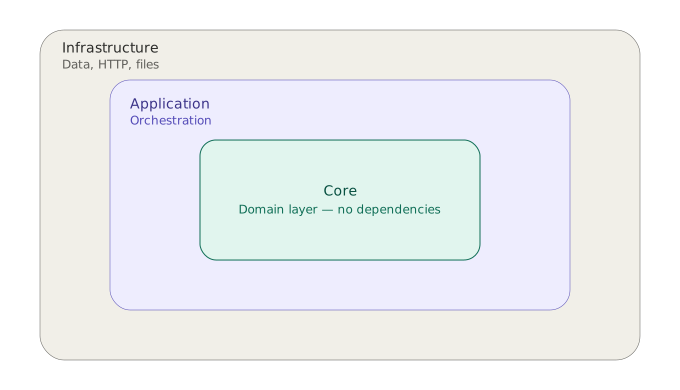
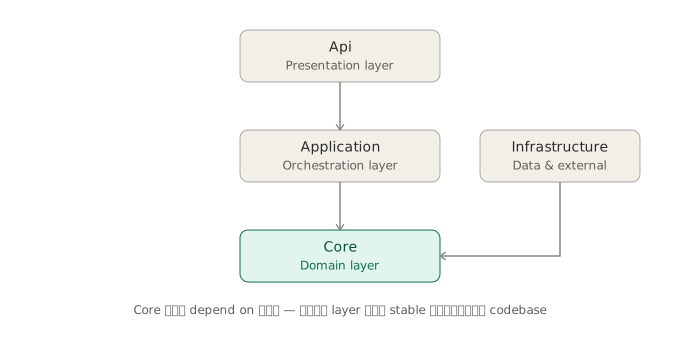
Core Layer (หรือที่เรียกว่า Domain Layer) คือ Layer ที่อยู่ในสุดของ Clean Architecture มันเป็น Layer เดียวที่ ไม่ depend on ใครเลย — ไม่รู้จัก Database, ไม่รู้จัก HTTP, ไม่รู้จักแม้แต่ Application Layer
Api → Application → Core
Infrastructure    → Core

Core ไม่ depend on ใคร — เป็น Layer ที่ stable ที่สุดใน codebase
Core Layer รับผิดชอบ 4 สิ่งหลัก:
- Business Rules — Pure functions ที่บอกว่าอะไรถูก อะไรผิด ตาม business
- Value Objects — Types ที่มี invariant ในตัวเอง เช่น
Money,Quantityที่ invalid state เป็นไปไม่ได้ - Interface Contracts — ประกาศว่า Core ต้องการอะไรจาก Infrastructure (Repository, ServiceClient)
- Domain Types — Records, Enums, Error definitions ที่ทุก Layer ใช้ร่วมกัน
สิ่งที่ Core Layer ไม่ทำ: orchestrate flow, เรียก Database โดยตรง, หรือรู้จัก HTTP request — นั่นเป็นหน้าที่ของ Application และ Infrastructure Layer
โครงสร้าง Folder ของ Core Layer
MyApp.Core/
├── Features/                                          ← Business Capabilities ทั้งหมด จัดตาม Feature
│   ├── Order/                                         ← Feature: ชื่อตาม Business Domain เสมอ
│   │   ├── Commands/                                  ← Write side: UseCase ที่เปลี่ยนแปลง state
│   │   │   ├── CreateOrder/                           ← 1 UseCase = 1 Folder
│   │   │   │   ├── CreateOrderRules.cs                ← static pure functions: Business Rules ของ UseCase นี้
│   │   │   │   └── ICreateOrderRepository.cs          ← Interface + Input/Output records (อยู่ไฟล์เดียวกัน)
│   │   │   └── CancelOrder/
│   │   │       ├── CancelOrderRules.cs
│   │   │       └── ICancelOrderRepository.cs
│   │   ├── Queries/                                   ← Read side: UseCase ที่อ่านข้อมูลอย่างเดียว
│   │   │   └── GetOrderDetail/
│   │   │       ├── GetOrderDetailRules.cs
│   │   │       └── IGetOrderDetailViewReader.cs       ← ใช้ "ViewReader" แทน "Repository" สำหรับ Query
│   │   └── Shared/                                    ← Types/Values/Enums/Errors/Rules/Interfaces ที่ใช้ข้าม UseCase
│   │       ├── OrderTypes.cs                          ← plain anemic records + Nested Model types ที่ใช้ข้าม UseCase
│   │       ├── OrderValues.cs                         ← Value Objects เช่น Money, Quantity, OrderNote (มี invariant ผ่าน Create เท่านั้น)
│   │       ├── OrderEnums.cs                          ← shared enums เช่น OrderStatus, PaymentMethod
│   │       ├── OrderErrors.cs                         ← Error definitions ของ Feature นี้ (ERR101-ERR199)
│   │       ├── OrderRules.cs                          ← shared pure Business Rules ที่ใช้ข้าม UseCase
│   │       ├── IOrderRepository.cs                    ← Repository Interface ที่ใช้ข้าม UseCase (ถ้ามี)
│   │       └── IOrderViewReader.cs                    ← ViewReader Interface ที่ใช้ข้าม UseCase (ถ้ามี)
│   └── Payment/                                       ← Feature อื่นๆ มีโครงสร้างเดียวกัน
│       ├── Commands/
│       ├── Queries/
│       └── Shared/
├── ServiceClients/                                    ← External Resource Contracts (peer กับ Features)
│   ├── IPaymentServiceClient.cs                       ← Interface + records ของ External Client แต่ละตัว
│   ├── IEmailServiceClient.cs
│   └── IFileStorageServiceClient.cs
└── Shared/                                            ← ใช้ร่วมกันข้าม Feature ทั้งหมด
    ├── CommonTypes.cs                                 ← plain records ที่ใช้ข้าม Feature
    ├── CommonValues.cs                                ← Value Types ที่ใช้ข้าม Feature เช่น UniqueId
    ├── CommonErrors.cs                                ← Error ทั่วไป เช่น Unauthorized, NotFound (ERR001-ERR099)
    └── ErrorCodeRegistry.cs                           ← จอง Error Code range ต่อ Feature ป้องกัน code ซ้ำ
โครงสร้างนี้มีหลักการสำคัญ 4 ข้อที่จะอธิบายในส่วนถัดไป
หลักการที่ 1 — Feature-first แทน Layer-first
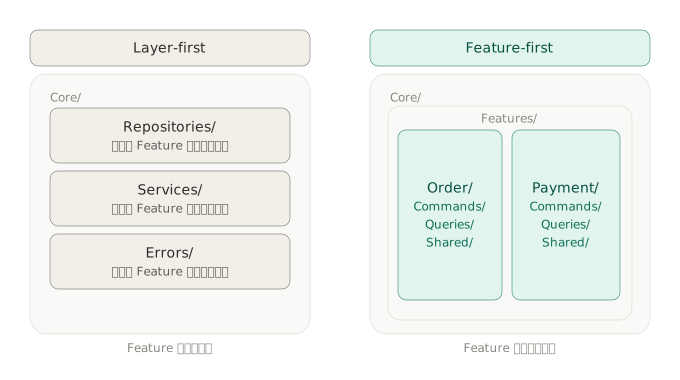
แนวทางที่พบบ่อยคือจัด folder ตาม technical role ก่อน:
❌ Layer-first
Core/
├── Repositories/       ← ทุก Feature รวมกัน
├── DomainServices/     ← ทุก Feature รวมกัน
└── Errors/             ← ทุก Feature รวมกัน
ปัญหาของแนวทางนี้คือเวลาแก้ Feature เดียว Developer ต้องเปิดอย่างน้อย 3 folder พร้อมกัน และเมื่อ project ใหญ่ขึ้น แต่ละ folder จะมีไฟล์หลายสิบไฟล์ที่ไม่เกี่ยวกัน
✅ Feature-first
Core/
└── Features/
    ├── Order/      ← ทุกอย่างของ Order อยู่ที่นี่
    └── Payment/    ← ทุกอย่างของ Payment อยู่ที่นี่
ข้อดีที่จับต้องได้:
- ลบ Feature ทิ้งได้โดยลบ folder เดียว — ไม่มี side effect กับ Feature อื่น
- ลด merge conflict — Developer แต่ละคนทำงานใน Feature folder ของตัวเองโดยไม่ชนกัน
- อ่านแล้วเข้าใจ business ได้ทันที — เปิด
Features/แล้วเห็นว่า project นี้ทำเรื่องอะไรบ้าง
หลักการที่ 2 — CQRS: แยก Commands ออกจาก Queries
ภายใน Feature แต่ละตัว แบ่งออกเป็น 2 ฝั่งตาม CQRS (Command Query Responsibility Segregation):
Features/Order/
├── Commands/   ← Write side: เปลี่ยนแปลง state
│   ├── CreateOrder/
│   └── CancelOrder/
└── Queries/    ← Read side: อ่านข้อมูล ไม่เปลี่ยน state
    └── GetOrderDetail/
Command และ Query มี concern ต่างกันชัดเจน:
- Command ต้อง validate business rules, enforce invariants, และ persist — มี side effect เสมอ
- Query อ่านข้อมูลอย่างเดียว ไม่เปลี่ยน state — ไม่มี side effect
การแยกนี้ยังสะท้อนออกมาใน Interface naming ทำให้รู้ทันทีว่า Interface นั้นทำอะไร:
ICreateOrderRepository   ← Command: write
IGetOrderDetailViewReader ← Query: read-only
ข้อดีของการแยก Command ออกจาก Query
ข้อที่ 1 — แยก optimization ได้อิสระ
Write ต้องการ consistency, transaction และ business rule enforcement ส่วน Read ต้องการ performance และ flexible data shape ถ้าใช้ Repository เดียวกัน ทั้งสองฝั่งถูกบังคับให้ใช้ model เดียวกัน ทำให้ optimize แต่ละฝั่งได้ไม่เต็มที่
เมื่อแยกออกจากกัน Repository optimize สำหรับ Write ได้เต็มที่ ส่วน ViewReader ใช้ raw SQL, Dapper, หรือ projection ตรงๆ ได้เลยโดยไม่กระทบ Write side
ข้อที่ 2 — Query คืน data shape ตาม UI ได้โดยตรง
ถ้าใช้ Repository เดียว GetByIdAsync ต้อง return Domain Model ทั้งก้อนแม้ UI ต้องการแค่บาง field:
UI ต้องการ:    OrderId, CustomerName, TotalAmount, LineCount
Domain Model:  OrderId, CustomerId, Lines[], Note, Status, ...

→ DB ดึงข้อมูลมาเกินจำเป็น
→ Application ต้อง map เอง
ViewReader return shape ตาม UI โดยตรง — DB query เฉพาะที่ต้องการ ไม่โหลด Domain Model ทั้งก้อน
ข้อที่ 3 — Scale อิสระ แยก read/write DB ได้ในอนาคตโดยไม่แก้โครงสร้าง
เมื่อมี concurrent requests Write transaction lock record อยู่ Read request ที่มาพร้อมกันต้องรอ Lock release ก่อน ทำให้ Read ช้าโดยไม่จำเป็น:
Request A (Write) → Lock record ระหว่าง transaction
Request B (Read)  → ต้องรอ Lock release ก่อนจึงจะ Read ได้
เพราะ Interface แยกกันอยู่แล้ว จึงสามารถแยก DataSource ได้ในอนาคตโดยไม่แตะ Application Layer:
Repository  → Primary DB    ← รับ Write Lock ได้
ViewReader  → Read Replica  ← ไม่มี Write Lock ไม่ถูก block
หลักการที่ 3 — UseCase-based Structure แทน Aggregate-based
นี่คือจุดที่แตกต่างจาก DDD แบบดั้งเดิมมากที่สุด
DDD แบบดั้งเดิม group Repository ตาม Aggregate:
// ❌ Aggregate-based — Fat Interface
public interface IOrderRepository
{
    Task CreateAsync(Order order);
    Task UpdateAsync(Order order);
    Task DeleteAsync(Guid id);
    Task<Order> GetByIdAsync(Guid id);
    Task<IEnumerable<Order>> GetByCustomerIdAsync(Guid customerId);
    Task<IEnumerable<Order>> GetByStatusAsync(string status);
    // method เพิ่มขึ้นเรื่อยๆ ตาม business ที่ซับซ้อนขึ้น
}
ปัญหาคือ Interface นี้ละเมิด Interface Segregation Principle — UseCase ที่ต้องการแค่ CreateOrderAsync ก็ยัง depend on ทุก method ทำให้ Mock ใน Unit Test ต้องไป setup method ที่ไม่เกี่ยวข้องด้วย
แนวทางที่ใช้คือ group Repository ตาม UseCase แทน:
// ✅ UseCase-based — Interface เล็ก ทำหน้าที่เดียว
public interface ICreateOrderRepository
{
    Task<bool> IsCustomerActiveAsync(Guid customerId, CancellationToken ct = default);
    Task<CreateOrderOutput> CreateOrderAsync(CreateOrderInput input, CancellationToken ct = default);
}

public interface ICancelOrderRepository
{
    Task<string> GetOrderStatusAsync(Guid orderId, CancellationToken ct = default);
    Task UpdateStatusAsync(Guid orderId, string status, CancellationToken ct = default);
}
แนวทางนี้เหมาะกับ Functional style ที่ Logic แยกออกจาก Data — Aggregate boundary ยังคงมีอยู่ผ่าน record แต่ behavior ย้ายออกมาเป็น Rules function แทนที่จะอยู่ใน method ของ object
Aggregate ยังมีอยู่ใน Functional style
คำถามที่พบบ่อยคือ “ถ้าไม่ใช้ Aggregate แล้ว Consistency boundary อยู่ที่ไหน?”
Aggregate ใน OOP ทำหน้าที่ 2 อย่างพร้อมกัน คือ ประกาศ boundary ว่าข้อมูลอะไรอยู่ด้วยกัน และ enforce consistency ผ่าน method ของ object ใน Functional style แยกทั้งสองออกจากกัน — boundary ยังมีอยู่ผ่าน record แต่ behavior ย้ายออกมาเป็น Rules function แทน:
// OOP + DDD — data + behavior อยู่ใน class เดียวกัน
// (ไม่มีใน Functional style — เปรียบเทียบเพื่อให้เห็นความต่าง)
public class Order
{
    public UniqueId OrderId { get; }
    public UniqueId CustomerId { get; }
    private readonly List<OrderLine> _lines;
    public IReadOnlyList<OrderLine> Lines => _lines;
    public string? Note { get; }
    public OrderStatus Status { get; private set; }

    private Order(UniqueId orderId, UniqueId customerId, List<OrderLine> lines, string? note)
    {
        OrderId    = orderId;
        CustomerId = customerId;
        _lines     = lines;
        Note       = note;
        Status     = OrderStatus.Pending;
    }

    // Factory method — validate + สร้าง Order พร้อมกัน
    public static Result<Order> Create(
        UniqueId customerId,
        List<OrderLine> lines,
        string? note)
    {
        if (lines.Count == 0)
            return Result.Failure(OrderErrors.EmptyOrderLines);

        if (lines.GroupBy(l => l.ProductId).Any(g => g.Count() > 1))
            return Result.Failure(OrderErrors.DuplicateProductLine);

        if (note?.Length > 500)
            return Result.Failure(OrderErrors.NoteTooLong);

        return Result.Success(new Order(
            UniqueId.New(), customerId, lines, note));  // ← UniqueId.New() สร้าง ID
    }

    // Method — behavior ของ Aggregate
    public Result AddLine(OrderLine line)
    {
        if (line.Quantity <= 0)                // ← Invariant ของ field อยู่ใน method
            return Result.Failure(OrderErrors.InvalidQuantity);
        _lines.Add(line);                      // ← mutate instance เดิม
        return Result.Success();
    }
}
ใน Functional style แต่ละส่วนแยกออกมาเป็น file ต่างกัน:
// Core/Features/Order/Shared/OrderTypes.cs
namespace MyApp.Core.Features.Order.Shared;

// Aggregate Root — boundary เหมือนกัน แต่เป็น record ไม่มี method
// Mapper เป็นคนสร้าง Order แทน Factory method ของ OOP
public sealed record Order(
    UniqueId OrderId,
    UniqueId CustomerId,
    IReadOnlyList<OrderLineVO> Lines,   // ← owns OrderLineVO (Model Type)
    OrderNote? Note,                    // ← Value Type
    OrderStatus Status
);

// Model Type — Entity ที่ own Value Types แทน Entity class ใน OOP
public sealed record OrderLineVO(
    UniqueId ProductId,
    Quantity Quantity,                   // ← Value Type
    Money UnitPrice                      // ← Value Type
);
// Core/Features/Order/Shared/OrderValues.cs
// Value Type — แทน Invariant ที่เคยอยู่ใน if ของ method และ Factory
public sealed record Quantity(int Value)
{
public static Result<Quantity> Create(int value) =>
value <= 0
? Result.Failure(OrderErrors.InvalidQuantity)
: Result.Success(new Quantity(value));
internal static Quantity FromTrustedValue(int value) => new(value);
}
public sealed record OrderNote(string Value)
{
public static Result<OrderNote> Create(string? value) =>
value?.Length > 500
? Result.Failure(OrderErrors.NoteTooLong)
: Result.Success(new OrderNote(value ?? string.Empty));
internal static OrderNote FromTrustedValue(string value) => new(value);
}// Core/Features/Order/Commands/CreateOrder/CreateOrderRules.cs
// Business Rules — แทน validation collection ที่เคยอยู่ใน Factory method
public static Result MustHaveOrderLines(CalculateOrderTotalRuleInput input) =>
input.Order.Lines.Count == 0
? Result.Failure(OrderErrors.EmptyOrderLines)
: Result.Success();
public static Result MustHaveUniqueProducts(CalculateOrderTotalRuleInput input) =>
input.Order.Lines.GroupBy(l => l.ProductId).Any(g => g.Count() > 1)
? Result.Failure(OrderErrors.DuplicateProductLine)
: Result.Success();// Application/Features/Order/Commands/CreateOrder/CreateOrderMapper.cs
// Mapper — แทน Factory method ของ Aggregate
// สร้าง Order พร้อม UniqueId.New() และ enforce Invariant ผ่าน Value Types
internal static Result<Order> ToOrder(CreateOrderCommand command)
{
var lines = new List<OrderLineVO>();
foreach (var line in command.Lines)
{
var productId = UniqueId.Create(line.ProductId);
if (productId.IsFailure) return Result<Order>.Failure(productId.Error);
var qty = Quantity.Create(line.Quantity);
if (qty.IsFailure) return Result<Order>.Failure(qty.Error);
var price = Money.Create(line.UnitPrice, "THB");
if (price.IsFailure) return Result<Order>.Failure(price.Error);
lines.Add(new OrderLineVO(productId.Value, qty.Value, price.Value));
}
var note = OrderNote.Create(command.Note);
if (note.IsFailure) return Result<Order>.Failure(note.Error);
var customerId = UniqueId.Create(command.CustomerId);
if (customerId.IsFailure) return Result<Order>.Failure(customerId.Error);
return Result<Order>.Success(new Order(
OrderId: UniqueId.New(),
CustomerId: customerId.Value,
Lines: lines,
Note: note.Value,
Status: OrderStatus.Pending
));
}ผลลัพธ์เหมือนกับ OOP + DDD แต่แยก responsibility ออกจากกันชัดเจน:
OOP + DDD                              Functional + UseCase-based
─────────────────────────────────────────────────────────────────
Aggregate class                        record (OrderTypes.cs)
  ├─ data                                ├─ data เหมือนกัน
  └─ behavior (method)                   └─ (ไม่มี method)

Entity class                           Model Type — {ModelName}VO (OrderTypes.cs)
  ├─ owns Value Object                   ├─ owns Value Type เหมือนกัน
  └─ behavior (method)                   └─ (ไม่มี method)

Value Object class                     Value Type (OrderValues.cs)
  └─ enforce invariant                   └─ enforce invariant เหมือนกัน

Aggregate method behavior              Rules function (CreateOrderRules.cs)
  └─ validate + mutate instance เดิม    └─ validate + คืน instance ใหม่
     (_lines.Add — แก้ object เดิม)        (record with — immutable)
Data Model 3 ประเภท
Core Layer มี Data Model 3 ประเภทที่มีความสัมพันธ์กันชัดเจน แต่ละประเภทมี scope และ responsibility ต่างกัน:
Context Type         — container ของ parameter ที่ส่งเข้า/รับออกจาก function
  └─ Model Type      — Entity ที่เป็น owner ของ Value Types
       └─ Value Type — enforce invariant ของ field นั้น
property แต่ละ type อาจเป็น primitive ได้ด้วย:
Context Type   → primitive, Model Type, หรือ Value Type
Model Type     → primitive หรือ Value Type
Value Type     → primitive เท่านั้น (single หรือ multi-field)
ตัวอย่างที่แสดงความสัมพันธ์ครบทั้ง 3 ประเภท พร้อม file path:
// Core/Features/Order/Commands/CreateOrder/CreateOrderRules.cs

// Context Type — Wrapper ของ parameter ที่ Rules ต้องการ
// ประกอบด้วย Order Model + I/O result จาก UseCase
public sealed record CalculateOrderTotalRuleInput(
    Order Order,              // ← Model Type (Mapper สร้างและ enforce Invariant แล้ว)
    bool IsCustomerActive     // ← I/O result — ไม่ได้อยู่ใน Order เพราะมาจาก DB
);
// Core/Features/Order/Shared/OrderTypes.cs
// Model Type — Entity ที่ own Value Types
public sealed record OrderLineVO(
UniqueId ProductId, // ← Identity ของ Product entity
Quantity Quantity, // ← Value Type
Money UnitPrice // ← Value Type
);// Core/Features/Order/Shared/OrderValues.cs
// Value Type — enforce invariant เท่านั้น ไม่มี calculation
public sealed record Quantity(int Value)
{
public static Result<Quantity> Create(int value) =>
value <= 0
? Result.Failure(OrderErrors.InvalidQuantity)
: Result.Success(new Quantity(value));
internal static Quantity FromTrustedValue(int value) => new(value);
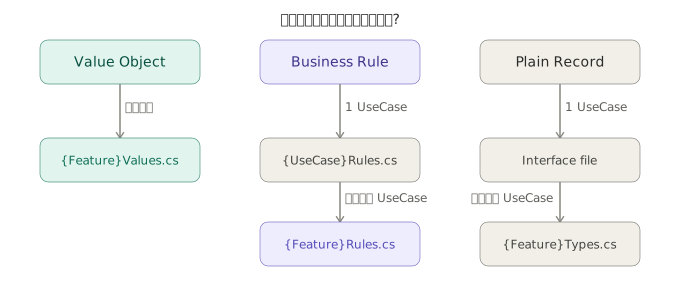
}ประกาศที่ไหน?
Data Model     ใช้โดยกี่ UseCase?    ประกาศที่ไหน
────────────────────────────────────────────────────────────────────
Context Type   1 UseCase           →  {UseCase}Rules.cs
               หลาย UseCase        →  {Feature}Types.cs ใน Shared/

Model Type     1 UseCase           →  {UseCase}Rules.cs  (co-located กับ Context Type)
               หลาย UseCase        →  {Feature}Types.cs ใน Shared/

Value Type     1 Feature           →  {Feature}Values.cs ใน Shared/
               หลาย Feature        →  Core/Shared/CommonValues.cs
💡
OrderLineVOที่อยู่ในCalculateOrderTotalRuleInputและในOrderrecord คือ type เดียวกัน — ถ้า share ข้าม UseCase ประกาศในOrderTypes.csเดียวกันได้เลย
ข้อดีของ Functional + UseCase-based เทียบกับ OOP + DDD
ใน OOP + DDD Developer ต้องถามตัวเองก่อนเขียน Logic ทุกครั้งว่า:
- Logic นี้เป็นของ Entity ไหน?
- ควรเป็น method ของ Aggregate หรือเปล่า?
- หรือนี่คือ Domain Service?
- Aggregate boundary ควรอยู่ตรงไหน?
คำถามเหล่านี้ไม่มีคำตอบที่ถูกต้องตายตัว ทำให้ทีมถกเถียงกันได้นานโดยไม่ได้ผลลัพธ์ที่ดีขึ้น
Functional + UseCase-based เปลี่ยนคำถามให้เหลือแค่ข้อเดียว:
"UseCase นี้ต้องการ Logic อะไร?"
        │
        ├─ pure function, ใช้ UseCase เดียว   → {UseCase}Rules.cs
        └─ pure function, ใช้หลาย UseCase    → {Feature}Rules.cs
นอกจากนี้ Consistency ยังถูก enforce ได้ 2 ชั้นแทน 1 ชั้น:
OOP + DDD     → enforce ที่ runtime ผ่าน Aggregate method
Functional    → enforce ที่ compile time ผ่าน Type system (Value Objects)
              + enforce ที่ runtime ผ่าน Rules function
หลักการที่ 4 — Interface และ Records อยู่ในไฟล์เดียวกัน
Records ที่เป็น Input/Output ของแต่ละ UseCase วางไว้ในไฟล์เดียวกับ Interface:
// Core/Features/Order/Commands/CreateOrder/ICreateOrderRepository.cs
namespace MyApp.Core.Features.Order.Commands.CreateOrder;

public sealed record CreateOrderInput(
    string OrderId,                    // ← extract จาก UniqueId.Value
    string CustomerId,
    IReadOnlyList<OrderLineRow> Lines,
    string? Note,
    decimal TotalAmount
);

// Nested type — ModelName = OrderLine, suffix Row = plain primitive
public sealed record OrderLineRow(
    string ProductId,
    int Quantity,
    decimal UnitPrice
);

public sealed record CreateOrderOutput(
    string OrderId,                    // ← plain string จาก DB
    string OrderNumber,
    DateTime CreatedAt
);

public interface ICreateOrderRepository
{
    Task<bool> IsCustomerActiveAsync(Guid customerId, CancellationToken ct = default);
    Task<CreateOrderOutput> CreateOrderAsync(CreateOrderInput input, CancellationToken ct = default);
}
เหตุผลที่ใช้ record แทน class:
- Immutable by default — ค่าที่ส่งผ่าน Layer ไม่สามารถถูกเปลี่ยนได้ ป้องกัน side effect
- Value equality — เปรียบเทียบ content ไม่ใช่ reference เหมาะสำหรับ Test
- Concise — ประกาศใน 1 บรรทัด ลด boilerplate
เหตุผลที่วางไว้ในไฟล์เดียวกัน คือเปิดไฟล์เดียวเห็น Contract ทั้งหมด ทั้ง method signature และ data shape ที่รับ/คืน
Business Rules ใน UseCase Rules File
แต่ละ UseCase มีไฟล์ {UseCase}Rules.cs ที่เก็บ static pure functions สำหรับ Business Rules ของ UseCase นั้นโดยเฉพาะ
หลักการแบ่ง Business Rule กับ Invariant
Invariant (Values.cs)  →  "field นี้ valid คืออะไร"
                           ไม่ต้องการ context อื่น
                           enforce per-field หรือ combination ของ field ในตัวเอง

Rule (Rules.cs)        →  "action นี้ทำได้มั้ย? และผลลัพธ์คืออะไร?"
                           ต้องการ context ข้ามกัน เช่น:
                           - I/O result (isCustomerActive จาก DB)
                           - Collection context (Lines.Count)
                           - Cross-field comparison (ProductId ซ้ำกัน)
                           - Calculation ข้าม collection (Sum ของ Lines)
Rule ควรมี Single Responsibility — แต่ละ function มีเหตุผลเดียวในการเปลี่ยน prefix Must บอกว่าเป็น enforcement ไม่ใช่ query และ ทุก Rule function รับ Context Type ของตัวเองเสมอ
Context Type แต่ละตัวมี static Create factory — ใช้เป็น named function ใน ROP chain เพื่อให้ span name ชัดเจนว่า “กำลังเตรียม input ให้ Rule ไหน”:
// Core/Features/Order/Commands/CreateOrder/CreateOrderRules.cs
namespace MyApp.Core.Features.Order.Commands.CreateOrder;

// Context Type มีแค่ parameter ที่ Rule นั้นต้องการจริงๆ
// Create            — ใช้ใน Imperative style
// CreateWithResult  — ใช้ใน ROP chain เพื่อให้ BeginTracingAsync และ Then รับต่อได้
// span name = "{TypeName}.CreateWithResult" เช่น "MustBeActiveCustomerRuleInput.CreateWithResult"

public sealed record MustBeActiveCustomerRuleInput(bool IsCustomerActive)
{
    public static MustBeActiveCustomerRuleInput Create(bool isActive) => new(isActive);
    public static Result<MustBeActiveCustomerRuleInput> CreateWithResult(bool isActive) =>
        Result.Success(Create(isActive));
}

public sealed record MustHaveOrderLinesRuleInput(Order Order)
{
    public static MustHaveOrderLinesRuleInput Create(Order order) => new(order);
    public static Result<MustHaveOrderLinesRuleInput> CreateWithResult(Order order) =>
        Result.Success(Create(order));
}

public sealed record MustHaveUniqueProductsRuleInput(Order Order)
{
    public static MustHaveUniqueProductsRuleInput Create(Order order) => new(order);
    public static Result<MustHaveUniqueProductsRuleInput> CreateWithResult(Order order) =>
        Result.Success(Create(order));
}

public sealed record CalculateOrderTotalRuleInput(Order Order)
{
    public static CalculateOrderTotalRuleInput Create(Order order) => new(order);
    public static Result<CalculateOrderTotalRuleInput> CreateWithResult(Order order) =>
        Result.Success(Create(order));
}

public static class CreateOrderRules
{
    // Enforcement Rules return Result — Context Type มีแค่ที่ใช้จริง
    public static Result MustBeActiveCustomer(MustBeActiveCustomerRuleInput input) =>
        input.IsCustomerActive
            ? Result.Success()
            : Result.Failure(OrderErrors.CustomerNotActive);

    public static Result MustHaveOrderLines(MustHaveOrderLinesRuleInput input) =>
        input.Order.Lines.Count == 0
            ? Result.Failure(OrderErrors.EmptyOrderLines)
            : Result.Success();

    public static Result MustHaveUniqueProducts(MustHaveUniqueProductsRuleInput input) =>
        input.Order.Lines.GroupBy(l => l.ProductId).Any(g => g.Count() > 1)
            ? Result.Failure(OrderErrors.DuplicateProductLine)
            : Result.Success();

    // Calculation Rule return Result<OrderTotal>
    public static Result<OrderTotal> CalculateOrderTotal(CalculateOrderTotalRuleInput input)
    {
        var totalValue = input.Order.Lines.Sum(l => l.UnitPrice.Value * l.Quantity.Value);
        return OrderTotal.Create(totalValue, "THB");
    }
}
สิ่งสำคัญคือ CreateOrderRules ต้องเป็น static และทุก method ต้องเป็น pure function — ไม่มี async, ไม่มี dependency injection, ไม่มี state ทำให้ Test ได้โดยตรงโดยไม่ต้อง mock อะไรเลย
💡 Invariant ทำหน้าที่แทน per-field validation แล้ว — Rules ไม่ต้องตรวจ
Quantity <= 0หรือUnitPrice < 0เพราะOrder.LinesมีOrderLineVOที่ Mapper enforce Invariant แล้วตั้งแต่ตอนสร้าง Order Model
Naming ของ Type ใน Rules File
แต่ละ Rule function มี Context Type ของตัวเองเสมอ — Wrapper ของ parameter ที่ Rule นั้นต้องการโดยเฉพาะ เมื่อ parameter เปลี่ยน แก้แค่ Context Type ไม่ต้องแก้ Function Signature:
Context type                            Nested type
──────────────────────────────────────────────────────────
{UseCase}Command       (App)         →  {ModelName}Item   plain primitive
{UseCase}Response      (App)         →  {ModelName}Item   plain primitive

{MethodName}RuleInput  (Core Rules)  →  Order Model หรือ primitive
{MethodName}Input      (Core Repo)   →  {ModelName}Row    plain primitive
{MethodName}Output     (Core Repo)   →  {ModelName}Row    plain primitive
ตัวอย่างครบทุก layer:
// Application — plain primitive
public sealed record CreateOrderCommand(IReadOnlyList<OrderLineItem> Lines, string? Note);
public sealed record OrderLineItem(string ProductId, int Quantity, decimal UnitPrice);

// Core Rules — Context Type มีแค่ที่ใช้จริง + Create และ CreateWithResult
public sealed record MustBeActiveCustomerRuleInput(bool IsCustomerActive)
{
    public static MustBeActiveCustomerRuleInput Create(bool isActive) => new(isActive);
    public static Result<MustBeActiveCustomerRuleInput> CreateWithResult(bool isActive) =>
        Result.Success(Create(isActive));
}
public sealed record MustHaveOrderLinesRuleInput(Order Order)
{
    public static MustHaveOrderLinesRuleInput Create(Order order) => new(order);
    public static Result<MustHaveOrderLinesRuleInput> CreateWithResult(Order order) =>
        Result.Success(Create(order));
}
public sealed record MustHaveUniqueProductsRuleInput(Order Order)
{
    public static MustHaveUniqueProductsRuleInput Create(Order order) => new(order);
    public static Result<MustHaveUniqueProductsRuleInput> CreateWithResult(Order order) =>
        Result.Success(Create(order));
}
public sealed record CalculateOrderTotalRuleInput(Order Order)
{
    public static CalculateOrderTotalRuleInput Create(Order order) => new(order);
    public static Result<CalculateOrderTotalRuleInput> CreateWithResult(Order order) =>
        Result.Success(Create(order));
}

// Core Repository — plain primitive
public sealed record CreateOrderInput(string OrderId, string CustomerId, IReadOnlyList<OrderLineRow> Lines, string? Note);
public sealed record OrderLineRow(string ProductId, int Quantity, decimal UnitPrice);
// Core/Features/Order/Commands/CreateOrder/CreateOrderRules.cs
public static class CreateOrderRules
{
public static Result MustBeActiveCustomer(MustBeActiveCustomerRuleInput input) =>
input.IsCustomerActive
? Result.Success()
: Result.Failure(OrderErrors.CustomerNotActive);
public static Result MustHaveOrderLines(MustHaveOrderLinesRuleInput input) =>
input.Order.Lines.Count == 0
? Result.Failure(OrderErrors.EmptyOrderLines)
: Result.Success();
public static Result MustHaveUniqueProducts(MustHaveUniqueProductsRuleInput input) =>
input.Order.Lines.GroupBy(l => l.ProductId).Any(g => g.Count() > 1)
? Result.Failure(OrderErrors.DuplicateProductLine)
: Result.Success();
public static Result<OrderTotal> CalculateOrderTotal(CalculateOrderTotalRuleInput input)
{
var totalValue = input.Order.Lines.Sum(l => l.UnitPrice.Value * l.Quantity.Value);
return OrderTotal.Create(totalValue, "THB");
}
}UseCase สร้าง Order ก่อน แล้วส่ง Context Type ผ่าน Create factory ต่อ Rule:
var orderResult = CreateOrderMapper.ToOrder(command);
if (orderResult.IsFailure) return orderResult.Error;
var order = orderResult.Value;                          // ← ใช้เป็น closure ใน chain

var isActive = await repo.IsCustomerActiveAsync(command.CustomerId, ct);

var activeCheck = CreateOrderRules.MustBeActiveCustomer(
    MustBeActiveCustomerRuleInput.Create(isActive));
if (activeCheck.IsFailure) return activeCheck.Error;

var linesCheck = CreateOrderRules.MustHaveOrderLines(
    MustHaveOrderLinesRuleInput.Create(order));
if (linesCheck.IsFailure) return linesCheck.Error;

var uniqueCheck = CreateOrderRules.MustHaveUniqueProducts(
    MustHaveUniqueProductsRuleInput.Create(order));
if (uniqueCheck.IsFailure) return uniqueCheck.Error;

var total = CreateOrderRules.CalculateOrderTotal(
    CalculateOrderTotalRuleInput.Create(order));
if (total.IsFailure) return total.Error;

var repoInput  = CreateOrderMapper.ToCreateOrderInput(order, total.Value);
var repoOutput = await repo.CreateOrderAsync(repoInput, ct);
return Result.Success(CreateOrderMapper.ToCreateOrderResponse(repoOutput));
กฎตัดสินใจ Naming และ Placement ของ Type
Type นี้คืออะไร?
        │
        ├─ Context type ของ Repository     →  {MethodName}Input / {MethodName}Output
        │   ประกาศใน Interface file            Nested type ใช้ {ModelName}Row (plain)
        │
        ├─ Context type ของ Rule function  →  {MethodName}RuleInput
        │   ประกาศใน Rules file                Wrapper ของ parameter ที่ Rule นั้นต้องการ
        │                                      อาจมี Order Model หรือ primitive
        │
        └─ Context type ของ Command/Query  →  {UseCase}Command / {UseCase}Response
            ประกาศใน Application Layer         Nested type ใช้ {ModelName}Item (plain)
💡 กฎตั้งชื่อ
Context type — MethodName หรือ UseCase name นำหน้า suffix บอก layer:
repo.CreateOrderAsync(CreateOrderInput)                    ← MethodName = CreateOrder
rules.CalculateOrderTotal(CalculateOrderTotalRuleInput)    ← MethodName = CalculateOrderTotal
Nested type — ModelName นำหน้า suffix บอก content:
OrderLineRow   ← ModelName = OrderLine, plain primitive (Repo)
OrderLineVO    ← ModelName = OrderLine, มี Value Type (Model)
OrderLineItem  ← ModelName = OrderLine, plain primitive (App)
Rule และ Repository ไม่รู้จักกันเลย — Mapper เป็นคนกลาง orchestrate ทั้งคู่เสมอ:
- สร้าง Order Model (enforce Invariant)
- สร้าง RuleInput (wrap Order + I/O result)
- extract Order → plain RepoInput
UniqueId — Entity Identity Type
UniqueId เป็น Value Type พิเศษที่ใช้เป็น Entity Identity ทั่วทั้ง codebase แตกต่างจาก Value Type อื่นตรงที่ ไม่มี format Invariant — ค่า string ทุกค่าที่ไม่ว่างถือว่า valid
ทำไมถึงสร้าง UniqueId แทน Guid หรือ string ตรงๆ?
Guid ตรงๆ    →  รองรับแค่ UUID format เท่านั้น
                 ถ้า Support team manual upload ใช้ "ORD-2024-001" จะ parse ไม่ได้
                 เปลี่ยน ID strategy ต้องแก้ทุก Mapper

string ตรงๆ  →  รับค่าอะไรก็ได้ ไม่มี type ที่สื่อ intent
                 ไม่รู้ว่า field นี้เป็น Identity หรือแค่ข้อมูลทั่วไป

UniqueId     →  รองรับทุก format (UUID, NanoId, human-readable)
                 type สื่อชัดว่าเป็น Entity Identity
                 เปลี่ยน ID strategy ได้จากที่เดียวใน New()
ทำไม UniqueId ต่างจาก Value Type อื่น?
Value Type ทั่วไปมี format Invariant ที่ชัดเจน:
Money    →  value >= 0
Quantity →  value > 0
OrderNote →  length <= 500
UniqueId ไม่มี format Invariant เพราะ business กำหนดแค่ว่า “ต้อง unique” ไม่ได้กำหนด format ดังนั้น Create ของ UniqueId ตรวจแค่:
ไม่ว่าง + ความยาวสมเหตุสมผล = valid// Core/Shared/CommonValues.cs
namespace MyApp.Core.Shared;
public sealed record UniqueId(string Value)
{
// ใช้เมื่อ ID มาจาก client (API request) — validate ก่อนใช้
// เช่น UpdateOrderCommand.OrderId, DeleteOrderCommand.OrderId
public static Result<UniqueId> Create(string value) =>
string.IsNullOrWhiteSpace(value)
? Result.Failure(CommonErrors.InvalidUniqueId)
: value.Length > 100
? Result.Failure(CommonErrors.UniqueIdTooLong)
: Result.Success(new UniqueId(value));
// ใช้เมื่อ system สร้าง ID ใหม่ — เช่น CreateOrder ใน Mapper
public static UniqueId New() =>
new(Guid.CreateVersion7().ToString());
// ใช้เมื่อ ID มาจาก DB — trusted source ไม่ต้อง validate
internal static UniqueId FromTrustedValue(string value) => new(value);
}New / Create / FromTrustedValue — ใช้เมื่อไหร่?
แหล่งที่มาของ ID          →  method ที่ใช้
─────────────────────────────────────────────────────────────
system สร้างใหม่          →  UniqueId.New()
                               Mapper เรียกตอนสร้าง Entity ใหม่

มาจาก client (API)        →  UniqueId.Create(command.OrderId)
                               validate ก่อนเสมอ
                               ใช้ใน UpdateCommand, DeleteCommand, GetQuery

มาจาก DB                  →  UniqueId.FromTrustedValue(entity.Id)
                               DB เป็น trusted source ไม่ต้อง validate
                               ใช้ใน Infrastructure Mapper
// CreateOrder — system สร้าง ID ใหม่
return new Order(OrderId: UniqueId.New(), ...);
// UpdateOrder — ID มาจาก client ต้อง validate
var orderId = UniqueId.Create(command.OrderId);
if (orderId.IsFailure) return orderId.Error;
// Infrastructure — ดึงจาก DB
var order = new Order(OrderId: UniqueId.FromTrustedValue(entity.OrderId), ...);รองรับทุก format
UUID v4    →  "550e8400-e29b-41d4-a716-446655440000"  ✅
UUID v7    →  "019447b2-3d8a-7c4e-9f5b-1a2b3c4d5e6f"  ✅
NanoId     →  "V1StGXR8_Z5jdHi6B-myT"                ✅
Human      →  "ORD-2024-001", "MANUAL-123"            ✅
💡
New()ใช้Guid.CreateVersion7()(UUID v7) เพราะมี timestamp prefix ทำให้ insert เรียงลำดับได้ ลด index fragmentation ใน DB ถ้าใช้ .NET เวอร์ชันก่อน 9 เปลี่ยนเป็นGuid.NewGuid().ToString()ได้เลยโดยแก้แค่บรรทัดเดียวในUniqueId.New()
Value Objects ใน OrderValues File
Value Object คือ type ที่มี invariant ในตัวเอง — invalid state เป็นไปไม่ได้ตั้งแต่ตอนสร้าง object ต่างจาก plain record ที่เป็น data carrier ธรรมดา
หลักการของ Value Type
Value Type  →  validate ว่า field หรือ combination ของ field valid มั้ย
               แล้วสร้างเป็น record เท่านั้น
               ไม่มี calculation ไม่มี transform

Rule        →  ใช้ Value Type ที่ guarantee แล้ว มา calculate หรือ enforce business context
💡 ทุก
recordใน codebase ควรเป็นsealedเสมอ — เพราะ record ใน C# สืบทอดได้ by default ถ้าไม่sealedใครก็ extend แล้ว bypass invariant ได้โดยไม่ผ่านCreate()การใส่sealedบอกชัดว่า “type นี้เป็น data carrier เท่านั้น ไม่ควร extend”
ตัวอย่าง Single field:
// Core/Features/Order/Shared/OrderValues.cs
namespace MyApp.Core.Features.Order.Shared;

public sealed record Money(decimal Value, string Currency)
{
    public static Result<Money> Create(decimal value, string currency) =>
        value < 0
            ? Result.Failure(OrderErrors.InvalidMoneyAmount)
            : Result.Success(new Money(value, currency));

    internal static Money FromTrustedValue(decimal value, string currency) =>
        new(value, currency);
}

public sealed record Quantity(int Value)
{
    public static Result<Quantity> Create(int value) =>
        value <= 0
            ? Result.Failure(OrderErrors.InvalidQuantity)
            : Result.Success(new Quantity(value));

    internal static Quantity FromTrustedValue(int value) =>
        new(value);
}

public sealed record OrderNote(string Value)
{
    public static Result<OrderNote> Create(string? value) =>
        value?.Length > 500
            ? Result.Failure(OrderErrors.NoteTooLong)
            : Result.Success(new OrderNote(value ?? string.Empty));

    internal static OrderNote FromTrustedValue(string value) =>
        new(value);
}

// OrderTotal — validate ว่ายอดรวมต้องมากกว่า 0
// ต่างจาก Money ที่อนุญาต 0 ได้ เพราะ Order ที่ยอดรวม 0 ไม่มีความหมาย
public sealed record OrderTotal(decimal Value, string Currency)
{
    public static Result<OrderTotal> Create(decimal value, string currency) =>
        value <= 0
            ? Result.Failure(OrderErrors.InvalidOrderTotal)
            : Result.Success(new OrderTotal(value, currency));

    internal static OrderTotal FromTrustedValue(decimal value, string currency) =>
        new(value, currency);
}
ตัวอย่าง Multi-field — OrderAddress รับหลาย field แต่ทำแค่ validate combination ไม่มี calculation:
public sealed record OrderAddress(string Street, string City, string PostalCode, string Country)
{
    // validate combination ของหลาย field — ยังคือ Invariant ไม่ใช่ Rule
    // เพราะไม่มี calculation ไม่มี transform ผลลัพธ์คือ record เดิมที่ guarantee valid
    public static Result<OrderAddress> Create(
        string street, string city, string postalCode, string country)
    {
        if (string.IsNullOrWhiteSpace(street))
            return Result.Failure(OrderErrors.InvalidStreet);

        if (string.IsNullOrWhiteSpace(city))
            return Result.Failure(OrderErrors.InvalidCity);

        if (!IsValidPostalCode(postalCode))
            return Result.Failure(OrderErrors.InvalidPostalCode);

        if (string.IsNullOrWhiteSpace(country))
            return Result.Failure(OrderErrors.InvalidCountry);

        // validate combination — PostalCode ต้องตรงกับ Country format
        if (country == "TH" && postalCode.Length != 5)
            return Result.Failure(OrderErrors.PostalCodeCountryMismatch);

        return Result.Success(new OrderAddress(street, city, postalCode, country));
    }

    internal static OrderAddress FromTrustedValue(
        string street, string city, string postalCode, string country) =>
        new(street, city, postalCode, country);

    private static bool IsValidPostalCode(string code) =>
        code?.Length == 5 && code.All(char.IsDigit);
}
Value Object มี 2 path ในการสร้างที่มี intent ต่างกันชัดเจน:
| Method | ใช้เมื่อ | จัดการ Result? |
|---|---|---|
Create | input มาจากภายนอก ยังไม่รู้ว่า valid มั้ย | ✅ ต้อง check IsFailure |
FromTrustedValue | caller มั่นใจแล้วว่า value valid เช่น ดึงมาจาก DB | ❌ ไม่ต้อง |
FromTrustedValue เป็น internal เพื่อจำกัดการใช้งานไว้ใน Core assembly เท่านั้น — Application หรือ Infrastructure Layer ไม่สามารถ bypass validation ได้
ตัวอย่างการใช้ Rules กับ Value Types:
// CreateOrderRules.CalculateOrderTotal ใช้ Value Types ที่ guarantee แล้วผ่าน Order Model
public static Result<OrderTotal> CalculateOrderTotal(CalculateOrderTotalRuleInput input)
{
    // input.Order.Lines มี OrderLineVO ที่ Mapper enforce Invariant แล้ว
    // Quantity > 0 และ UnitPrice >= 0 guarantee แล้วตั้งแต่ Mapper สร้าง Order
    var totalValue = input.Order.Lines.Sum(l => l.UnitPrice.Value * l.Quantity.Value);

    // OrderTotal.Create enforce ว่า total > 0
    return OrderTotal.Create(totalValue, "THB");
}
Value Object ประกาศที่ระดับ Feature เสมอ ไม่ใช่ระดับ UseCase เพราะ Money, Quantity, OrderNote, OrderTotal, OrderAddress เป็น domain concept ของ Order ทั้งหมด ไม่ได้เป็นของ CreateOrder โดยเฉพาะ ถ้า Value Object ใช้ข้าม Feature ค่อยย้ายขึ้นไป Core/Shared/CommonValues.cs
ความต่างระหว่าง OrderTypes.cs กับ OrderValues.cs:
| File | เก็บอะไร | ตัวอย่าง | มี invariant? |
|---|---|---|---|
OrderTypes.cs | plain anemic records + Nested Model types | OrderLineVO — Nested Model ที่ property เป็น VO | ❌ |
OrderValues.cs | Value Objects จริงๆ ที่มี Create enforce invariant | Money, Quantity, OrderNote, OrderTotal, OrderAddress | ✅ |
💡
OrderLineVOไม่ใช่ Value Object — suffixVOบอกแค่ว่า property ข้างในเป็น Value Object ตัวOrderLineVOเองไม่มีCreateและไม่ enforce invariant ตัวเอง จึงอยู่ในOrderTypes.csไม่ใช่OrderValues.cs
Shared Business Rules — เมื่อ Rule เดียวกันใช้หลาย UseCase
เมื่อ Business Rule ซ้ำกันใน UseCase มากกว่า 1 ตัว ให้ย้ายออกมาไว้ที่ {Feature}Rules.cs ใน Shared/
Business Rule นี้ถูกใช้โดยกี่ UseCase?
        │
        ├─ 1 UseCase    →  คงไว้ใน {UseCase}Rules.cs
        │
        └─ หลาย UseCase →  ย้ายมา Features/{Feature}/Shared/{Feature}Rules.cs
ทำไมใช้ชื่อ Rules ไม่ใช่ชื่ออื่น:
| ชื่อ | ปัญหา |
|---|---|
OrderDomain.cs | ชนกับ CreateOrderRules.cs ที่มีอยู่แล้ว และ “Domain” กว้างเกินไป |
OrderService.cs | สื่อว่ามี dependency injection ซึ่งไม่ใช่ |
OrderRules.cs | ✅ ชัดเจนว่าเป็น pure Business Rules ที่ share กันข้าม UseCase |
// Core/Features/Order/Shared/OrderRules.cs
namespace MyApp.Core.Features.Order.Shared;

// Shared Context Type — มี Create factory เหมือนกับ {UseCase}Rules
public sealed record MustHaveOrderLinesRuleInput(Order Order)
{
    public static MustHaveOrderLinesRuleInput Create(Order order) => new(order);
}

public static class OrderRules
{
    public static Result MustHaveOrderLines(MustHaveOrderLinesRuleInput input) =>
        input.Order.Lines is null || input.Order.Lines.Count == 0
            ? Result.Failure(OrderErrors.EmptyOrderLines)
            : Result.Success();
}
{UseCase}Rules.cs delegate ไปที่ shared rule:
// Core/Features/Order/Commands/CreateOrder/CreateOrderRules.cs
public static Result MustHaveOrderLines(MustHaveOrderLinesRuleInput input) =>
    OrderRules.MustHaveOrderLines(input);
⚠️
OrderRules.csต้องเป็นstaticและทุก method ต้องเป็น pure function เช่นเดียวกับ{UseCase}Rules.cs— ถ้า Rule ต้องการasyncหรือ I/O นั่นไม่ใช่ Business Rule แล้ว ให้ย้าย logic นั้นไปอยู่ใน UseCase ของ Application Layer
💡 กฎที่ควรจำ: อย่า optimize ก่อนมีปัญหาจริง — วาง Rule ไว้ใน
{UseCase}Rules.csก่อนเสมอ เพราะ Rule นั้นเป็นของ UseCase นั้น ย้ายออกมา{Feature}Rules.csก็ต่อเมื่อ UseCase อื่นต้องการ Rule เดียวกันจริงๆ เท่านั้น
ServiceClients — External Resource Contracts
ServiceClients/ เป็น folder ระดับเดียวกับ Features/ ไม่ใช่ลูกของ Feature ใด Feature หนึ่ง:
Core/
├── Features/        ← Business Capabilities
└── ServiceClients/  ← External Resource Contracts
เหตุผลที่แยกออกมา:
- ServiceClient เช่น Payment Gateway ถูกใช้ได้โดยหลาย Feature จึงไม่ควรอยู่ใน Feature ใด Feature หนึ่ง
- มันคือ Domain Boundary Definition — Core ประกาศว่าต้องการ External Resource นี้ โดยไม่สนว่า Infrastructure จะ implement ด้วย HTTP หรือ gRPC
// Core/ServiceClients/IPaymentServiceClient.cs
namespace MyApp.Core.ServiceClients;

public sealed record ChargePaymentInput(string OrderId, decimal Amount, string Currency);
public sealed record ChargePaymentOutput(string TransactionId, string Status, DateTime ProcessedAt);

public interface IPaymentServiceClient
{
    Task<Result<ChargePaymentOutput>> ChargeAsync(
        ChargePaymentInput input,
        CancellationToken ct = default
    );
}
Suffix ServiceClient ทุกตัวทำให้ค้นหาใน IDE ได้ทันทีโดยพิมพ์แค่ “ServiceClient” เห็นทุก interface พร้อมกัน
Shared Folder — ทั้งระดับ Feature และระดับ Core
มี Shared/ อยู่ 2 ระดับที่มีความหมายต่างกัน:
Feature-level Shared
Core/Features/Order/Shared/
├── OrderTypes.cs        ← plain anemic records + Nested Model types (เช่น OrderLineVO)
├── OrderValues.cs       ← Value Objects จริงๆ ที่มี invariant ผ่าน Create (เช่น Money, Quantity, OrderNote)
├── OrderEnums.cs
├── OrderErrors.cs
├── OrderRules.cs        ← shared pure Business Rules
├── IOrderRepository.cs  ← Repository Interface ที่ใช้ข้าม UseCase (ถ้ามี)
└── IOrderViewReader.cs  ← ViewReader Interface ที่ใช้ข้าม UseCase (ถ้ามี)
ทุกอย่างใน Shared/ ใช้ rule เดียวกัน — ย้ายมาก็ต่อเมื่อถูกใช้โดย UseCase มากกว่า 1 ตัว เท่านั้น ถ้ายังใช้แค่ UseCase เดียวให้คง co-located ไว้ใน UseCase folder ก่อน
เมื่อไหร่ควรย้าย Interface มา Shared
Interface ที่ย้ายมา Shared จะเปลี่ยนชื่อจาก ICreateOrderRepository → IOrderRepository เพราะไม่ผูกกับ UseCase ใด UseCase หนึ่งแล้ว:
// Core/Features/Order/Shared/IOrderRepository.cs
namespace MyApp.Core.Features.Order.Shared;

// method ที่ UseCase หลายตัวใช้ร่วมกันจริงๆ เท่านั้น
public interface IOrderRepository
{
    Task<bool> IsCustomerActiveAsync(Guid customerId, CancellationToken ct = default);
}
⚠️ ต้องระวัง — ถ้าย้ายแล้ว Interface เริ่มใหญ่ขึ้น นั่นคือ signal ว่ากำลังกลับไปเป็น Fat Interface เหมือน Aggregate-based แบบเดิม
กฎตัดสินใจก่อนย้าย:
UseCase ที่ใช้ Interface เดียวกัน — ใช้ method เดียวกันจริงๆ มั้ย?
        │
        ├─ ใช้ method เดียวกันจริง  →  ย้ายมา Shared ได้
        │
        └─ ใช้คนละ method           →  คงแยก Interface ไว้
                                        อย่ารวมแค่เพราะ "เป็น Order เหมือนกัน"
// ✅ ย้ายมา Shared เพราะ CreateOrder และ UpdateOrder ใช้ method เดียวกันจริงๆ
public interface IOrderRepository
{
Task<bool> IsCustomerActiveAsync(Guid customerId, CancellationToken ct = default);
}
// ❌ ไม่ควรรวม เพราะแต่ละ UseCase ใช้ method ของตัวเอง
public interface IOrderRepository
{
Task<CreateOrderOutput> CreateOrderAsync(...); // ของ CreateOrder เท่านั้น
Task UpdateStatusAsync(...); // ของ CancelOrder เท่านั้น
Task<OrderSummary> GetSummaryAsync(...); // ของ GetOrderSummary เท่านั้น
}Core-level Shared
Core/Shared/
├── CommonTypes.cs       ← plain records ที่ใช้ข้าม Feature
├── CommonValues.cs      ← Value Types ที่ใช้ข้าม Feature เช่น UniqueId
├── CommonErrors.cs      ← Error ที่เกิดได้ทุก Feature เช่น Unauthorized, NotFound
└── ErrorCodeRegistry.cs ← จอง Error Code range ต่อ Feature
UniqueId ประกาศใน CommonValues.cs เพราะทุก Entity ในทุก Feature ต้องการ Identity — ดู section UniqueId ด้านบนสำหรับรายละเอียด
ErrorCodeRegistry.cs แก้ปัญหา Error Code ซ้ำโดยไม่ต้องรวมทุก Feature ไว้ไฟล์เดียว:
// Core/Shared/ErrorCodeRegistry.cs
// จอง range ต่อ Feature — Developer เพิ่ม Error ใน range ของตัวเองได้เลย

// Common       : ERR001 - ERR099  → Core/Shared/CommonErrors.cs
// Order        : ERR101 - ERR199  → Core/Features/Order/Shared/OrderErrors.cs
// Payment      : ERR201 - ERR299  → Core/Features/Payment/Shared/PaymentErrors.cs
// Notification : ERR301 - ERR399  → Core/Features/Notification/Shared/NotificationErrors.cs
// Core/Features/Order/Shared/OrderErrors.cs
namespace MyApp.Core.Features.Order.Shared;
public static class OrderErrors
{
public static readonly Error OrderNotFound = Errors.Register(
"ERR101", "Order not found.", StatusCodes.Status404NotFound);
public static readonly Error EmptyOrderLines = Errors.Register(
"ERR102", "Order must have at least one line.", StatusCodes.Status400BadRequest);
public static readonly Error CustomerNotActive = Errors.Register(
"ERR103", "Customer account is not active.", StatusCodes.Status400BadRequest);
}Naming Conventions
ใช้ PascalCase ทั้ง Folder และ File
✅ Features/Order/Commands/CreateOrder/ICreateOrderRepository.cs
❌ features/order/commands/create-order/i-create-order-repository.cs
Namespace ใน C# ต้อง match กับ Folder path และ Class name ต้อง match กับ File name หากใช้ kebab-case จะทำให้ Namespace กับ Folder ไม่ตรงกัน
File Suffix บอก Role ของไฟล์
💡 กฎตั้งชื่อ
Context type — MethodName หรือ UseCase name นำหน้า suffix บอก layer:
repo.CreateOrderAsync(CreateOrderInput)              ← MethodName = CreateOrder
rules.CalculateOrderTotal(CalculateOrderTotalRuleInput)  ← MethodName = CalculateOrderTotal
Nested type — ModelName นำหน้า suffix บอก content:
OrderLineRow   ← ModelName = OrderLine, plain primitive (Repo)
OrderLineVO    ← ModelName = OrderLine, มี Value Object (Rules)
OrderLineItem  ← ModelName = OrderLine, plain primitive (App)
| Suffix / ชื่อ | ใช้กับ | Nested type | มี invariant? |
|---|---|---|---|
{UseCase}Rules | static pure functions: Business Rules ของ UseCase นั้น | — | ❌ |
{Feature}Rules | static pure functions: Business Rules ที่ share ข้าม UseCase | — | ❌ |
{Feature}Values | Value Objects จริงๆ: มี invariant enforce ผ่าน Create เช่น Money, Quantity, OrderNote | — | ✅ |
{Feature}Types | plain anemic records + Nested Model types เช่น OrderLineVO, OrderLineRow | — | ❌ |
{Feature}Enums | shared enums | — | ❌ |
{Feature}Errors | Error definitions | — | ❌ |
{MethodName}Input | Context type ส่งเข้า Repository — ประกาศใน Interface file | {ModelName}Row | ❌ |
{MethodName}Output | Context type รับจาก Repository — ประกาศใน Interface file | {ModelName}Row | ❌ |
{MethodName}RuleInput | Context type ส่งเข้า Rules function — ประกาศใน Rules file | {ModelName}VO | ❌ |
{MethodName}RuleOutput | Context type รับจาก Rules function — ประกาศใน Rules file | {ModelName}VO | ❌ |
I{UseCase}Repository | Interface สำหรับ Command (write) side | — | ❌ |
I{UseCase}ViewReader | Interface สำหรับ Query (read) side | — | ❌ |
I{Name}ServiceClient | Interface สำหรับ External Resource | — | ❌ |
Feature ต้องตั้งชื่อตาม Business Domain
✅ Order, Payment, Notification, Inventory
❌ ExternalService, DataAccess, HttpClient
Feature name ที่เป็น Technical Term บอกว่า “ทำยังไง” แต่ไม่บอกว่า “ทำอะไร”
Namespace Map
Assembly: MyApp.Core

MyApp.Core.Features.{Feature}.Commands.{UseCase}  → Rules + Interface + Records
MyApp.Core.Features.{Feature}.Queries.{UseCase}   → Rules + Interface + Records
MyApp.Core.Features.{Feature}.Shared              → Types, Values, Enums, Errors, Rules, Interfaces
MyApp.Core.ServiceClients                         → External Client Interfaces + Records
MyApp.Core.Shared                                 → Common Types, Values, Errors, ErrorCodeRegistry
Application Layer จะ using จาก Core ตามนี้:
using MyApp.Core.Features.Order.Commands.CreateOrder; // Interface + Rules + Records
using MyApp.Core.Features.Order.Shared;               // Values, Types, Errors, OrderRules
using MyApp.Core.ServiceClients;                      // ถ้าใช้ External Client
using MyApp.Core.Shared;                              // ถ้าใช้ Common Errors
สรุป
Core Layer ที่ดีมีลักษณะ 3 ข้อ:
- ไม่รู้จักใคร — ไม่มี dependency ออกไปยัง Layer อื่น สามารถ Test ได้อย่างสมบูรณ์โดยไม่ต้องมี Database
- สะท้อน Business — เปิด
Features/แล้วเห็น business domain ได้ทันที ไม่ใช่เห็น technical category - Interface เล็ก — แต่ละ Interface ออกแบบให้ UseCase เดียวใช้ ไม่มี Fat Interface ที่ทำหลายหน้าที่
บทความถัดไปในซีรีส์นี้จะพูดถึง Application Layer ซึ่งเป็น Layer ที่ orchestrate การทำงานโดยเรียกใช้ Core Layer — ครอบคลุม UseCase, Mapper และ Command/Query pattern
คำถามที่พบบ่อย
Q: Context Type กับ Nested Type ต่างกันอย่างไร และตั้งชื่อยังไง?
A: ต่างกันที่ role ของ type:
Context Type — type ที่รวบรวม data ทั้งหมดที่ function นั้นต้องการ ตั้งชื่อตาม MethodName + suffix บอก layer:
{MethodName}Input / {MethodName}Output         ← Repository
{MethodName}RuleInput / {MethodName}RuleOutput ← Rules
{UseCase}Command / {UseCase}Response           ← Application
Nested Type — type ที่เป็น property ของ Context Type ตั้งชื่อตาม ModelName + suffix บอก content:
{ModelName}Row   ← plain primitive ใน Repository context
{ModelName}VO    ← มี Value Object ใน Rules context
{ModelName}Item  ← plain primitive ใน Application context
ตัวอย่าง OrderLine entity ที่ปรากฏในทุก layer:
OrderLineRow    อยู่ใน CreateOrderInput          → plain primitive (Repo)
OrderLineVO     อยู่ใน Order.Lines               → มี Value Type (Model)
OrderLineItem   อยู่ใน CreateOrderCommand        → plain primitive (App)
OrderLineVO อยู่ใน OrderTypes.cs ใน Shared ไม่ใช่ OrderValues.cs เพราะตัวมันเองไม่มี invariant — แค่ property เป็น Value Type
Q: ทำไม Rule function ถึงรับ Model ที่ enforce Invariant แล้ว แทนที่จะรับ primitive ตรงๆ?
A: มี 2 แนวทางที่นิยมใช้กัน แต่ละแบบมี rationale ต่างกัน:
แนวทางที่ 1 — รับ primitive (นิยมใน Railway-Oriented Programming และ F# community)
// Rule รับ primitive แล้ว enforce ทั้ง Invariant และ Business Rule ใน function เดียว
public static Result<OrderTotal> CalculateOrderTotal(
    decimal unitPrice, int quantity, bool isActive)
{
    if (!isActive)      return Result.Failure(OrderErrors.CustomerNotActive);
    if (quantity <= 0)  return Result.Failure(OrderErrors.InvalidQuantity);   // ← Invariant
    if (unitPrice < 0)  return Result.Failure(OrderErrors.InvalidUnitPrice);  // ← Invariant
    return OrderTotal.Create(unitPrice * quantity, "THB");
}
ข้อดี: function เป็น self-contained ไม่ต้องรู้ว่า caller สร้าง type อะไรมาก่อน
แนวทางที่ 2 — รับ Model ที่ enforce Invariant แล้ว (นิยมใน DDD และ “Parse Don’t Validate”)
// Rule รับ Context Type ที่มี Order Model ที่ guarantee แล้ว
// ไม่ต้องตรวจ Invariant ซ้ำ
public static Result<OrderTotal> CalculateOrderTotal(CalculateOrderTotalRuleInput input)
{
    // input.Order.Lines มี OrderLineVO ที่ Quantity > 0 และ UnitPrice >= 0 guarantee แล้ว
    var totalValue = input.Order.Lines.Sum(l => l.UnitPrice.Value * l.Quantity.Value);
    return OrderTotal.Create(totalValue, "THB");
}
ข้อดี: type system รับประกัน validity ตลอดทาง Rules เหลือแค่ Business context
Series นี้ใช้ แนวทางที่ 2 ตามหลักการ “Parse Don’t Validate” ของ Alexis King:
อย่า validate ซ้ำๆ ทุกที่
parse ครั้งเดียวตอนรับข้อมูลเข้า
แล้วใช้ type system guarantee ตลอดทาง
Mapper คือ “parse” step — enforce Invariant ครั้งเดียวตอนสร้าง Order Model หลังจากนั้น Rules ไม่ต้องตรวจ Invariant ซ้ำอีกเลย
Q: Core Layer ต่างจาก Domain Layer ใน DDD อย่างไร?
A: role เดียวกันครับ แต่วิธีแสดง concept ออกมาในโค้ดต่างกัน:
| Concept | OOP + DDD | Functional style |
|---|---|---|
| Aggregate boundary | class ที่มี behavior | record ที่ประกาศ shape |
| Business Rules | method ของ object | static pure functions ใน {UseCase}Rules.cs |
| Value Objects | class ที่ enforce ตัวเอง | record + Create ใน {Feature}Values.cs |
ผลที่ได้เหมือนกัน แต่แต่ละ concept มีที่อยู่ชัดเจน Interface เล็กลง และ Test ง่ายขึ้น
Q: Invariant กับ Business Rule ต่างกันอย่างไร?
A: ต่างกันที่ “เป็นของ type หรือเป็นของ action”:
Invariant — "field นี้ valid คืออะไร" ไม่ต้องการ context อื่น enforce per-field หรือ combination ของ field
"Money ต้องไม่ติดลบ"             → Money.Create
"Quantity ต้องมากกว่า 0"          → Quantity.Create
"PostalCode ต้องตรงกับ Country"   → OrderAddress.Create
→ อยู่ใน {Feature}Values.cs
Business Rule — "action นี้ทำได้มั้ย? และผลลัพธ์คืออะไร?" ต้องการ context ข้ามกัน
"Customer ต้องเป็น Active"        → ต้องการ I/O result
"Order ต้องมีอย่างน้อย 1 line"   → ต้องการ collection context
"ไม่มี Product ซ้ำ"               → ต้องการ cross-field comparison
"คำนวณ OrderTotal"                → calculation ข้าม collection
→ อยู่ใน {UseCase}Rules.cs
กฎง่ายๆ ถามว่า “ถ้าเอา type นี้ไปใช้ใน UseCase อื่น invariant นี้ยังใช้ได้มั้ย?” ถ้าใช่ → Invariant ถ้าไม่ใช่ → Business Rule
Q: Value Object ควรมี method อะไรบ้าง?
A: มีได้ 2 method เท่านั้น — ไม่มี calculation ไม่มี transform:
Create — validate + enforce invariant คืน Result<T>:
var price = Money.Create(command.UnitPrice, "THB");
if (price.IsFailure) return price.Error;
FromTrustedValue — bypass validation เมื่อ caller มั่นใจแล้วว่า value valid:
// totalValue มาจาก Value Objects ที่ guarantee แล้ว — caller รับผิดชอบ
var total = OrderTotal.FromTrustedValue(totalValue, "THB");
ถ้าต้องการ calculation เช่น “คำนวณ Total จาก Lines” — นั่นเป็น Business Rule ไม่ใช่ Invariant ควรอยู่ใน {UseCase}Rules.cs:
// ✅ calculation อยู่ใน Rule — ไม่ใช่ใน Value Type
public static Result<OrderTotal> CalculateOrderTotal(IReadOnlyList<OrderLineVO> lines)
{
    var totalValue = lines.Sum(l => l.UnitPrice.Value * l.Quantity.Value);
    return OrderTotal.Create(totalValue, "THB");
}
⚠️ ห้ามใช้
new ValueObject(...)ตรงๆ — ใช้CreateหรือFromTrustedValueเสมอ
Q: {UseCase}Rules.cs กับ {Feature}Rules.cs ต่างกันอย่างไร?
A: ต่างกันที่ scope:
{UseCase}Rules.cs— Business Rules ที่เป็นของ UseCase นั้นโดยเฉพาะ วางไว้ใน UseCase folder{Feature}Rules.cs— Business Rules ที่ UseCase หลายตัวใน Feature เดียวกันใช้ร่วมกัน วางไว้ในShared/
กฎง่ายๆ คือเริ่มต้นที่ {UseCase}Rules.cs เสมอ ย้ายออกมา {Feature}Rules.cs ก็ต่อเมื่อมีการ copy logic จริงๆ เท่านั้น
Q: OrderValues.cs กับ OrderTypes.cs ต่างกันอย่างไร?
A: ต่างกันที่ มี invariant จริงๆ หรือไม่:
OrderValues.cs— Value Objects จริงๆ ที่มีCreateenforce invariant เช่นMoney,Quantity,OrderNote— invalid state เป็นไปไม่ได้ตั้งแต่ตอนสร้างOrderTypes.cs— plain anemic records และ Nested Model types เช่นOrderLineVO,OrderLineRow— ไม่มี invariant ในตัวเอง แต่ property อาจเป็น Value Object ได้
OrderLineVO อยู่ใน OrderTypes.cs ไม่ใช่ OrderValues.cs เพราะ suffix VO บอกแค่ว่า property ข้างในเป็น Value Object ตัว OrderLineVO เองไม่มี Create และไม่ enforce invariant ตัวเอง
ถ้าเห็นว่ากำลังจะเขียน Create ที่ validate — นั่นคือ signal ว่า type นั้นควรอยู่ใน OrderValues.cs แทน
Q: ทำไม Query ถึงใช้ ViewReader ไม่ใช่ Repository?
A: เพื่อสื่อ intent ที่ต่างกันชัดเจน:
Repository— write side มี side effect เปลี่ยนแปลง stateViewReader— read-only ไม่มี side effect ดึงข้อมูลอย่างเดียว
ชื่อบอก Developer ทันทีว่า Interface นั้นปลอดภัยต่อการเรียกซ้ำและไม่มีผลข้างเคียง และในอนาคตถ้าต้องการแยก read/write database connection ก็ทำได้โดยไม่ต้องเปลี่ยนโครงสร้าง
Q: ทำไมถึงไม่ใช้ class แบบ mutable สำหรับ Input/Output?
A: class แบบ mutable มีความเสี่ยงที่ Layer หนึ่งจะเปลี่ยนค่า object ที่ Layer อื่นกำลังใช้งานอยู่ — เป็น side effect ที่หาสาเหตุยากมาก record แก้ด้วย immutability by default และมี value equality ทำให้ assert ใน Test ได้ตรงๆ โดยไม่ต้อง override Equals
Q: ควรย้าย Record หรือ Rules ไปที่ Shared/ ตั้งแต่แรกเลยดีมั้ย?
A: ไม่ควรครับ ให้ทุกอย่างอยู่ co-located กับ UseCase ที่ใช้มันก่อนเสมอ เพราะ Record หรือ Rule นั้นเป็นของ UseCase นั้น ย้ายมา Shared/ ก็ต่อเมื่อ UseCase มากกว่า 1 ตัวต้องการสิ่งเดียวกันจริงๆ การย้ายเร็วเกินไปทำให้ Shared/ กลายเป็น dumping ground และ Developer ต้อง navigate หา Record หรือ Rule ที่จริงๆ แล้วใช้แค่ที่เดียว
Q: ข้อผิดพลาดที่พบบ่อยที่สุดใน Core Layer คืออะไร?
A: มี 5 ข้อที่พบบ่อยที่สุด:
- Rules method มี
async— เมื่อ method ต้องการ I/O นั่นไม่ใช่ Business Rule ควรย้ายไปใน UseCase ของ Application Layer - ใส่ calculation ใน Value Object — เช่น
OrderTotal.FromLines(lines)ทำให้ boundary ไม่ชัด Value Type มีแค่CreateและFromTrustedValuecalculation อยู่ใน Rule - ชื่อ Rule ไม่สะท้อน intent — เช่น
ValidateLinesแทนMustHaveOrderLinesควรใช้ prefixMustสำหรับ enforcement และCalculateสำหรับ calculation - ตั้งชื่อ type ผิด pattern — เช่น ใช้
OrderDataแทนOrderLineVOsuffixRow/VO/Itemบอก content เสมอ - Feature ชื่อตาม Technical Term — เช่น
ExternalServiceแทนที่จะเป็นPayment
Q: Core Layer เกี่ยวข้องกับ SOLID principles อย่างไร?
A: ออกแบบสอดคล้องกับ SOLID 3 ข้อโดยตรง:
- Interface Segregation — UseCase-based Interface แทน Fat Interface ทำให้แต่ละ UseCase depend เฉพาะ method ที่ตัวเองใช้
- Dependency Inversion — Core ประกาศ Interface แต่ไม่ implement เอง Infrastructure เป็นคน implement ตาม contract
- Single Responsibility —
{UseCase}Rules.csรับผิดชอบแค่ Business Rules,{Feature}Values.csรับผิดชอบแค่ Value Objects, Interface file รับผิดชอบแค่ Contract